

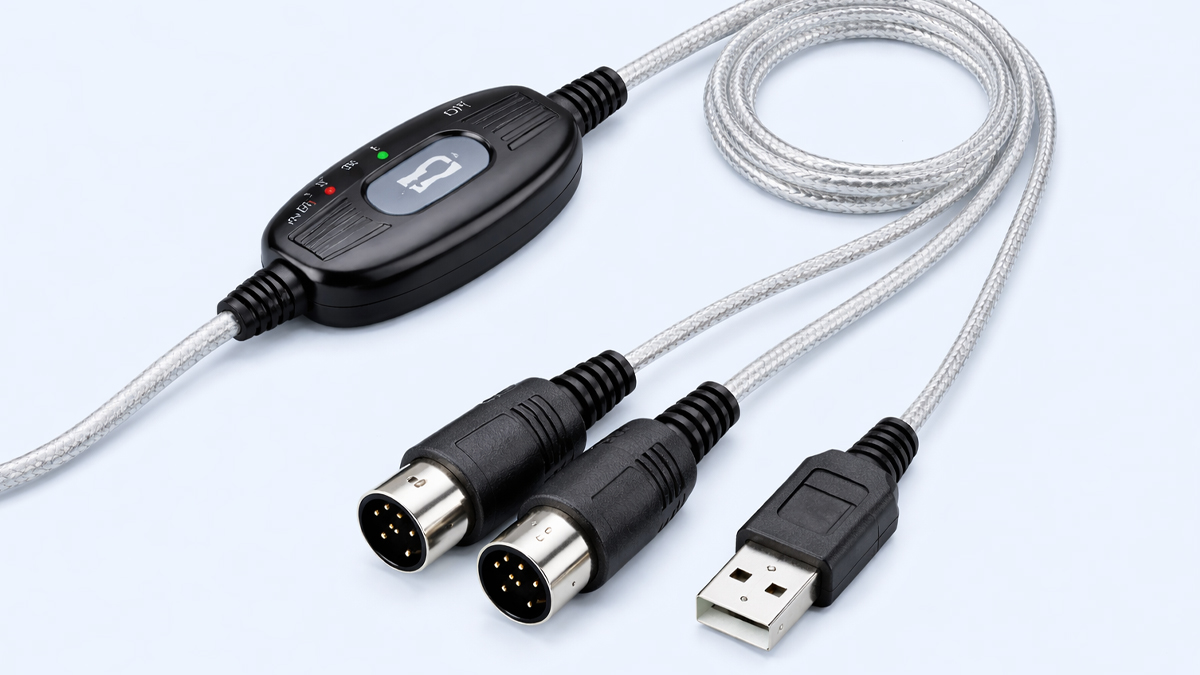
What is USB MIDI Interface?
A USB MIDI Interface is a hardware or software bridge that lets musical instruments and music devices communicate with computers, tablets, smartphones, and other digital music systems using MIDI data over USB. MIDI stands for Musical Instrument Digital Interface. It is not audio. It is a language of musical instructions such as which note was played, how hard it was played, when it started, when it stopped, and which instrument sound should be used.
In the world of smart musical instruments, a USB MIDI Interface is one of the most important connection methods because it turns musical actions into digital messages that can be recorded, edited, shared, and played back with great accuracy. Many modern keyboards, drum pads, digital pianos, wind controllers, guitars with MIDI pickups, and controller surfaces either include USB MIDI directly or rely on an external USB MIDI Interface to connect to a computer or mobile device.
Purpose: The core purpose is to transmit MIDI messages reliably between instruments and digital systems so that musicians can control software instruments, synchronize devices, and manage performance setups in studios, classrooms, and live stages.
Position in the music industry: It sits at the connection point between physical music making and digital production, making it a key part of modern music workflows.
How does USB MIDI Interface Work?
A USB MIDI Interface works by converting and transporting MIDI messages through a USB connection. Depending on the setup, it can operate in one of two common ways. First, it can translate classic 5 pin DIN MIDI signals from older instruments into USB MIDI for a computer. Second, it can provide USB MIDI communication for devices that already support MIDI over USB, acting as a hub or routing tool.
Signal flow: When you press a key on a MIDI keyboard, the keyboard creates a MIDI Note On message that includes details like note number, velocity, and channel. That message is sent through the interface into the USB connection and then to your music software. When you release the key, a Note Off message is sent. If you turn a knob, the device sends Control Change messages. If you use a sustain pedal, it sends another control message.
Driver and class compliance: Many interfaces are class compliant, meaning the operating system recognizes them automatically without extra drivers. Others use dedicated drivers to achieve lower latency, better timing, and more advanced routing features.
Timing and buffering: The interface packages MIDI messages into USB data frames, manages buffering, and tries to keep timing stable. Good interfaces focus on low jitter, consistent timing, and reliable throughput, especially when multiple MIDI ports are active at the same time.
Bidirectional communication: USB MIDI is two way. Your computer can send MIDI back to the instrument, for example to change patches, control parameters, start and stop a sequencer, or synchronize tempo with MIDI clock.
What are the Components of USB MIDI Interface?
A USB MIDI Interface includes several building blocks that make the connection stable, compatible, and musical in real time.
USB connection module: This is the part that handles USB communication with the host device such as a computer or tablet. It manages enumeration, power negotiation, and data transfer.
MIDI input and output ports: Many interfaces include traditional MIDI IN and MIDI OUT ports for older gear. Some include multiple sets of ports. Some also provide MIDI THRU or virtual thru functionality through software.
Microcontroller or processing chip: This chip interprets incoming MIDI messages, queues them, timestamps or schedules them in some designs, and routes them to the correct output. In advanced models it can handle filtering, merging, splitting, and multi port routing.
Power management: USB can provide power, but power requirements vary. Some interfaces run entirely from USB bus power. Others need an external power adapter, especially when they act as multi port hubs or provide extra features like standalone routing.
Firmware: The internal software decides how the interface behaves. Firmware controls port mapping, LED behavior, timing strategy, and special modes such as standalone operation or multi client support.
Indicators and controls: Many interfaces include LED indicators for power, USB link, MIDI activity, and port specific signal flow. Some include switches for mode selection, merge, thru, or routing presets.
Software tools: Many interfaces come with configuration utilities for routing, port naming, filtering, clock settings, and firmware updates. In professional environments, clear software control is a major advantage.
What are the Types of USB MIDI Interface?
USB MIDI Interfaces come in several types based on how they connect, how many ports they support, and how they are used in smart musical instrument ecosystems.
Single cable USB to MIDI adapters: These are simple and affordable devices with one MIDI IN and one MIDI OUT connected to a USB cable. Use case: connecting a single older keyboard or sound module to a computer.
Multi port USB MIDI interfaces: These provide multiple MIDI inputs and outputs such as 2×2, 4×4, 8×8, or more. Use case: studios with many synths, drum machines, and rack modules.
USB MIDI hubs and host boxes: Some devices act as USB hosts so you can connect USB MIDI controllers without a computer. Use case: standalone performance rigs and smart instrument setups on stage.
Audio interface with MIDI ports: Many audio interfaces include MIDI IN and MIDI OUT in addition to audio inputs and outputs. Use case: a combined solution for recording audio and controlling MIDI gear.
Wireless and Bluetooth supported MIDI bridges: Some interfaces offer USB plus wireless options. Use case: mobile music creation and classroom environments where cable management matters.
Network enabled MIDI interfaces: Advanced models can route MIDI over Ethernet or Wi Fi and also provide USB connectivity. Use case: complex studios, scoring stages, and multi room setups.
Smart instrument integrated USB MIDI: Many modern instruments have built in USB MIDI functionality. Use case: direct connection to software without extra hardware.
What are the Applications of USB MIDI Interface?
USB MIDI Interfaces are used wherever musical control needs to move between physical instruments and digital systems.
Studio production: They connect keyboards, drum pads, control surfaces, and hardware synthesizers to a DAW for recording MIDI performances, editing notes, and driving virtual instruments.
Live performance: They allow musicians to trigger backing tracks, switch sounds, control lighting or video cues via MIDI, and synchronize tempo across multiple devices.
Music education: In classrooms and online learning, USB MIDI lets students connect keyboards to learning apps, notation software, and ear training tools. Teachers can track performance and provide feedback.
Film and game scoring: Composers use MIDI controllers to perform orchestral parts into sample libraries. USB MIDI ensures fast response and accurate capture of expression.
Sound design and synthesis: MIDI messages can modulate parameters in software synths, control automation, and create evolving textures using knobs, sliders, and pads.
DJ and electronic music performance: Controllers send MIDI to control mixing, effects, clips, and loops in performance software.
Accessibility and adaptive instruments: Smart musical instruments designed for accessibility often use USB MIDI to map gestures, switches, and custom controllers into musical control.
What is the Role of USB MIDI Interface in Music Industry?
The music industry relies on fast creation, flexible collaboration, and repeatable performance. USB MIDI Interfaces support all of these by making musical control data portable and standardized.
Bridge between legacy and modern gear: Many studios still use classic MIDI hardware. USB MIDI Interfaces keep that gear usable with modern computers and modern production workflows.
Standardization of control: MIDI is a common language. USB makes it easy to connect that language to nearly every modern device. This reduces compatibility problems and helps musicians work across brands and platforms.
Enabler of smart musical instruments: Smart instruments often include sensors, onboard processing, and app integration. USB MIDI provides a dependable path for that intelligence to communicate with creative tools.
Support for remote collaboration: MIDI data files are small compared to audio. Musicians can share MIDI parts, and collaborators can change tempo, key, sound, and articulation without re recording audio.
Faster production cycles: Producers can quickly build arrangements with MIDI, swap instruments, refine timing, and create polished tracks efficiently.
Industry integration: MIDI is used not only for music notes, but also for stage automation, lighting control, show synchronization, and interactive installations. USB MIDI is often the easiest entry point for these systems.
What are the Objectives of USB MIDI Interface?
A USB MIDI Interface is designed with clear objectives that serve musicians, producers, educators, and developers.
Reliability: The interface should deliver consistent operation across long sessions without dropouts or random disconnects.
Low latency: Musical performance feels natural when delay is low. The objective is to reduce the time between an action on the instrument and the response in software or another device.
Accurate timing: Beyond raw latency, timing stability matters. Good interfaces aim to reduce jitter so that rhythms stay tight, especially for drums and fast arpeggios.
Compatibility: The interface should work across common operating systems and music applications. Class compliant designs target plug and play simplicity.
Expandability: Multi port designs aim to scale with a studio as more hardware is added.
Flexibility in routing: Many users need to split, merge, filter, or remap MIDI messages. Advanced interfaces target this objective with internal processing and software control.
Integration with smart ecosystems: As instruments become smarter, the objective includes seamless use with apps, firmware updates, and device recognition with meaningful port names.
What are the Benefits of USB MIDI Interface?
USB MIDI Interfaces deliver practical benefits that improve creativity, productivity, and performance.
Simple connection: USB is widely available and easy to use. Many users can connect and start working quickly.
Cost effective upgrades: Instead of replacing older MIDI gear, an interface can bring it into a modern setup.
Cleaner workflows: MIDI is data, not audio. That means you can edit notes, fix timing, change chords, and test different sounds without re recording.
Creative control: With MIDI, one performance can control many instruments, layers, and effects. You can map knobs and pads to software parameters and shape sound in real time.
Portability: Small interfaces are easy to travel with. This is valuable for touring musicians, mobile producers, and educators.
Better organization: Multi port interfaces reduce the need for constant cable swapping and help keep large setups manageable.
Support for automation and synchronization: USB MIDI can carry clock, start and stop messages, and control signals that keep devices working together.
Better learning: Students can see their performance visually in software, improving understanding of rhythm, pitch, and expression.
What are the Features of USB MIDI Interface?
Features vary by model, but the most useful features relate to performance, routing, and compatibility.
Port count and scalability: Interfaces may offer 1×1, 2×2, 4×4, 8×8, or more. More ports allow more instruments without complex daisy chaining.
Class compliant operation: Many units work without drivers on major operating systems. This is ideal for beginners and mobile setups.
Dedicated drivers and low latency modes: Professional interfaces may offer specialized drivers for better timing and stability.
Standalone routing: Some interfaces can route MIDI without a computer. This is useful for live rigs and rehearsal spaces.
MIDI merge and split: The ability to combine multiple inputs into one output or split one input to multiple outputs.
Filtering and transformation: Interfaces may filter aftertouch, program changes, or certain control messages. Some can transpose notes, remap channels, or scale controller values.
Multi client support: Some drivers allow multiple applications to access the MIDI ports at the same time.
USB hub functionality: A few devices include additional USB ports to connect controllers through the same unit.
Visual feedback: LED activity indicators help troubleshoot cables and signal flow quickly.
Firmware updates and configuration software: Better interfaces support updates and provide clear control panels for routing and naming.
What are the Examples of USB MIDI Interface?
Examples can be grouped by how they are used in real music setups.
USB to MIDI cable adapter: A compact adapter that connects one classic keyboard with MIDI ports to a laptop for recording notes into a DAW.
2×2 studio interface: A small interface with two MIDI inputs and two MIDI outputs used for a keyboard plus a sound module, allowing recording and playback without unplugging.
8×8 rack interface: A studio grade interface that manages a full room of synthesizers, drum machines, and effects units, often with routing presets and port naming.
Audio interface with MIDI: A combined audio and MIDI interface used by singer producers who record vocals and guitars while controlling software instruments from a keyboard.
USB host MIDI box: A standalone device that lets a USB keyboard control a hardware synth with 5 pin MIDI, useful when a computer is not part of the performance rig.
Smart instrument direct USB MIDI: A modern digital piano with a USB port that sends and receives MIDI directly with music learning apps and notation software.
Controller surface integration: A pad controller that uses USB MIDI to trigger drum samples and control mixer parameters inside a DAW.
What is the Definition of USB MIDI Interface?
Definition: A USB MIDI Interface is a device or software component that enables the transfer of MIDI messages between musical instruments and digital host systems through a USB connection, allowing control, synchronization, and communication for music creation and performance.
Scope: The definition includes both simple adapters that convert classic MIDI to USB and advanced multi port units that manage routing, filtering, and standalone operation.
Core idea: It carries musical instructions, not recorded sound.
What is the Meaning of USB MIDI Interface?
Meaning: The meaning of a USB MIDI Interface is best understood as a translator and delivery system for musical intent. When a musician plays, turns a knob, or presses a pad, the instrument produces a stream of meaningful performance data. The USB MIDI Interface ensures that data reaches the destination device accurately and on time.
Practical meaning for musicians: It means you can use one instrument to play many sounds, capture performances for editing, and build professional productions without needing to record audio for every idea.
Meaning for smart musical instruments: It means smart instruments can communicate their sensor data and performance gestures to apps and software in a standardized way, enabling interactive learning, expressive control, and connected features.
Meaning for the industry: It means interoperability. Studios, stages, schools, and creators can mix and match gear while still speaking the same digital music language.
What is the Future of USB MIDI Interface?
The future of USB MIDI Interface technology is strongly connected to the growth of smart musical instruments, mobile creation, and more expressive performance data.
MIDI 2.0 and higher resolution control: As MIDI 2.0 adoption increases, interfaces will increasingly support higher resolution messages, better device discovery, and richer communication. This will benefit smart instruments that capture subtle expression like finger pressure, breath, bowing style, or per note articulation.
Tighter integration with mobile devices: More musicians create on phones and tablets. Interfaces will focus on easy connectivity, low power use, and strong compatibility with mobile operating systems.
Hybrid connectivity: Future interfaces will often combine USB, wireless MIDI, and network MIDI so that a studio or stage can choose the best connection method for each situation.
Smarter routing and automation: Configuration software will become more intelligent, offering templates for common rigs, automatic device naming, and quick troubleshooting tools. Some interfaces may learn typical routing patterns and suggest improvements.
Improved timing and reliability: As live performance rigs become more complex, timing stability will be a bigger selling point. Better buffering strategies, optimized drivers, and modern USB implementations will keep performance tight.
Security and device management: As instruments become connected, there will be more focus on secure firmware updates, device authentication, and reliable long term support.
Eco system features: Interfaces may connect directly with cloud based project setups so that when you open a project, your MIDI routing and device mappings configure automatically.
Greater accessibility: Smart instruments and adaptive controllers will continue to grow, and USB MIDI Interfaces will be a key tool for mapping non traditional inputs into musical performance.
Summary
- A USB MIDI Interface transfers MIDI performance and control data over USB, connecting smart musical instruments with computers and mobile devices.
- It carries musical instructions such as notes, timing, velocity, and controller movements, not audio recordings.
- It supports studio production, live performance, education, sound design, scoring, and connected smart instrument workflows.
- Common types include single cable adapters, multi port interfaces, audio interfaces with MIDI, USB host boxes, wireless bridges, and network enabled solutions.
- Key objectives include reliability, low latency, accurate timing, broad compatibility, and flexible routing.
- Benefits include easy setup, modern use of legacy gear, powerful editing, creative control, portability, and synchronization across devices.
- Important features include port count, class compliance, driver support, standalone routing, filtering, transformation, and clear configuration software.
- The future will be shaped by smarter instruments, mobile creation, hybrid connectivity, improved timing, and wider support for MIDI 2.0 capabilities.

