

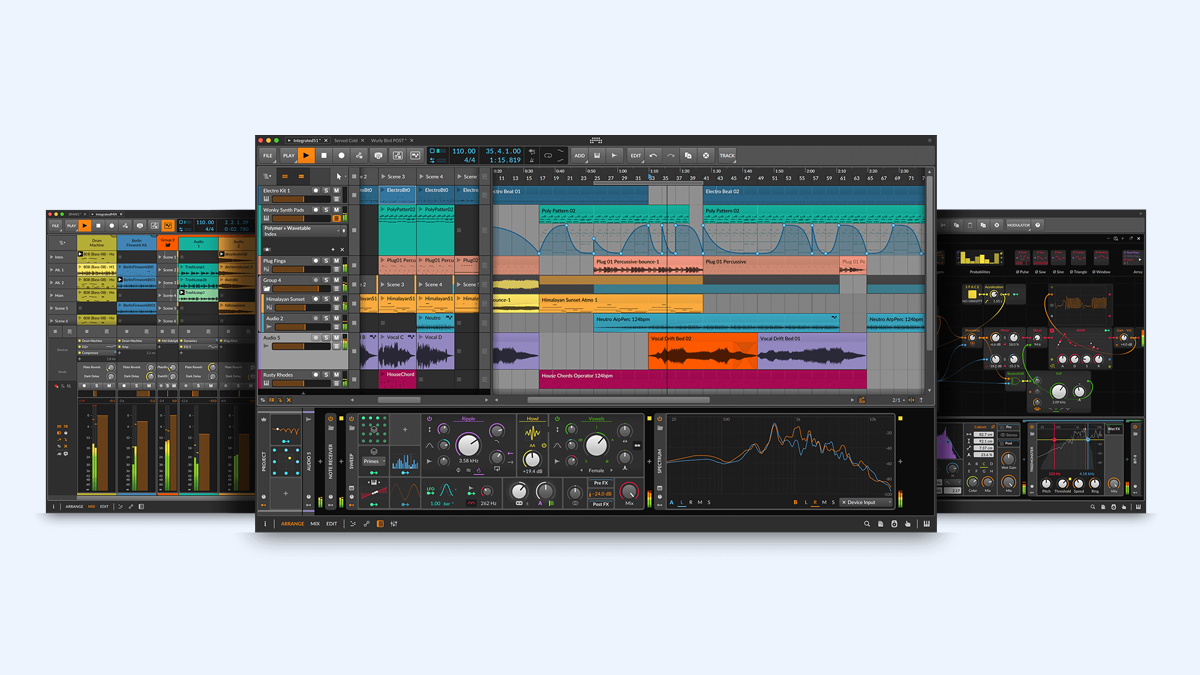
What is Bitwig Studio?
Bitwig Studio is a modern Digital Audio Workstation that musicians and audio creators use to compose, record, arrange, edit, mix, and perform music on a computer. It is designed to handle the full music production workflow from the first idea to a finished track. Bitwig Studio is widely known for its creative approach to sound design, its flexible modulation system, and its ability to support both linear arrangement and clip based creation in one environment.
At a basic level, Bitwig Studio is the place where audio and MIDI come together. Audio is the sound you record or import, like vocals, guitars, or drum loops. MIDI is musical instruction data that tells instruments what notes to play, how long to hold them, and how hard to play them. In Bitwig Studio, you can record audio with a microphone or instrument, program MIDI notes for synths and drum machines, edit everything with precision, and then mix the result into a polished song.
Bitwig Studio also stands out because it is built with experimentation in mind. It encourages you to try ideas quickly, test different sound directions, and create movement in your music without getting stuck in complicated routing. It includes built in instruments, effects, modulators, and an advanced system for connecting them. It also supports third party plug ins, so you can expand your studio with more synths, samplers, and mixing tools.
Another important part of Bitwig Studio is its performance and live workflow. Many producers like to sketch ideas using clips and scenes, then move to the arrangement view to build a full track. This makes Bitwig Studio suitable for electronic music producers, film composers, beat makers, sound designers, and even live performers who want reliable control over their sets.
How does Bitwig Studio Work? Step by Step Guide
Bitwig Studio works by organizing your music into tracks and time. Each track can hold audio or MIDI. Each track can also contain devices, which are instruments and effects that shape the sound. You can create music in two main ways. One way is arrangement based, where everything is placed on a timeline. Another way is clip based, where you trigger sections of music in real time.
Below is a clear step by step understanding of how Bitwig Studio typically works for a complete music production flow.
Project setup: You start by creating a new project, setting a tempo, and choosing an audio interface for input and output. This helps Bitwig Studio know how to play sound through your speakers and how to record from your microphone or instruments.
Track creation: You add tracks based on what you need. Audio tracks are used for recording or importing sound. Instrument tracks are used for MIDI driven instruments like synthesizers. Hybrid tracks can handle audio and MIDI depending on your workflow.
Sound source selection: You choose how you will generate sound. For audio, you record a performance or import existing files. For MIDI, you load an instrument device such as a synth, drum machine, sampler, or a third party plug in.
Recording or programming: You either record audio directly into a track, or you record MIDI using a keyboard controller. If you do not record, you can draw notes into the piano roll editor, step sequence drums, or use built in tools to generate patterns.
Editing: You clean and shape your recordings. Audio editing can include trimming, splitting, stretching, fading, pitch editing, and comping takes. MIDI editing can include moving notes, changing timing, adjusting velocity, adding slides, and refining grooves.
Device chain building: You add effects and processors to shape the sound. Typical devices include EQ, compression, saturation, reverb, delay, chorus, and filters. In Bitwig Studio, these are placed as a chain on each track, and you can also create complex chains with layers.
Modulation and automation: You add movement and expression. Automation is when you draw changes over time, like increasing reverb in a chorus. Modulation is when one signal or control source influences another, like an LFO moving a filter cutoff. Bitwig Studio makes modulation fast by letting you map modulators to almost any parameter.
Arrangement and structure: You build the song. You can use the clip launcher to sketch sections, then record your performance into the arranger. Or you can build directly on the timeline by copying parts and making variations.
Mixing: You balance all tracks. You adjust levels, panning, EQ, compression, and effects sends. You use buses and groups to manage multiple tracks together. You also check your mix on different speakers and headphones.
Export and sharing: You render the final song to an audio file, such as WAV or MP3, for distribution. You can also export stems, which are separate track files used for collaboration or mastering.
What are the Components of Bitwig Studio?
Bitwig Studio includes several major components that work together to help you produce music efficiently. Understanding these components helps you learn faster and build better projects.
Interface views: Bitwig Studio generally offers a clip launcher view and an arrangement view. Clip launcher is best for building ideas in loops and triggering scenes. Arrangement view is best for creating a full timeline based song.
Tracks: Tracks are containers for audio and MIDI. You can create audio tracks, instrument tracks, group tracks, and effect tracks. Tracks can also be routed to buses for better mixing control.
Clips: Clips are small containers that hold audio loops or MIDI patterns. You can launch them in real time, repeat them, and combine them into scenes. Clips can also contain automation and expressions.
Arranger timeline: The arranger is the linear timeline where your full song is laid out. You place clips, audio, and MIDI events along the timeline and create structure such as intro, verse, chorus, and outro.
Devices: Devices are tools that generate or process sound. Devices include instruments, audio effects, note effects, and utility devices. Bitwig Studio has many built in devices, and it can also host third party plug ins.
Modulators: Modulators are control sources that automate parameters in a musical way. Examples include LFO, envelope follower, step modulator, random modulator, and macro controls. Modulation is a key strength of Bitwig Studio.
Automation system: Automation allows you to draw parameter changes over time. You can automate almost anything, such as volume, filter cutoff, effect mix, and plugin parameters. Automation can exist inside clips or on the arrangement timeline.
Mixing console: The mixer shows track levels, panning, inserts, sends, and routing. It helps you balance the project and apply processing across tracks and groups.
Browser and library: The browser helps you find presets, samples, instruments, effects, and projects quickly. A strong browser saves time and keeps you creative.
Routing and groups: Routing controls where audio and MIDI go. Groups help you control many tracks together. Sidechain routing helps you create pumping effects, ducking vocals, and dynamic interactions.
Audio engine: The audio engine is the core system that processes sound. Bitwig Studio is designed to be efficient and stable, supporting modern multi core CPUs.
What are the Types of Bitwig Studio?
When people ask about the types of Bitwig Studio, it usually means the different ways Bitwig Studio can be used or the different editions and workflows it supports. Bitwig Studio is not just one fixed method. It can fit multiple production styles.
Edition type: Bitwig Studio is available as a main full version and sometimes additional variants depending on licensing or bundles offered by the company. The key idea is that different editions may offer different sets of devices or features, but the core concept remains the same, which is a complete DAW focused on creativity and modulation.
Workflow type: Bitwig Studio supports multiple workflows, and many users switch between them depending on the task.
Clip based production type: This type is focused on building loops and triggering scenes. It is ideal for electronic music, live sets, and quick idea generation. You create clips for drums, bass, chords, and melodies, then launch them together to test combinations.
Arrangement based production type: This type is focused on composing on a timeline. It is ideal for full songs, film scoring, structured arrangements, and detailed automation. You place audio and MIDI parts directly on the timeline.
Hybrid production type: This type combines both clip launching and arrangement editing. You may sketch in clips, then record your clip performance into the arranger, and then edit like a traditional timeline song.
Sound design type: This type focuses on building unique instruments and effects chains using modulation, routing, layers, and device containers. Bitwig Studio is often chosen by sound designers because it makes complex modulation feel natural.
Live performance type: This type focuses on performing music in real time using controllers and clip launching. You can create scenes, map controls, and manipulate effects while playing.
What are the Applications of Bitwig Studio?
Bitwig Studio has a wide range of applications in music and audio creation. It is used by beginners and professionals because it can cover both simple and advanced tasks.
Music composition: Bitwig Studio helps composers create chord progressions, melodies, basslines, and full arrangements. MIDI tools allow fast editing and musical experimentation.
Beat making: Producers use Bitwig Studio to create drum patterns, layer samples, program grooves, and build modern beats for hip hop, trap, pop, and electronic genres.
Recording and production: Artists record vocals, guitars, bass, and other instruments into Bitwig Studio. They can edit takes, comp vocals, apply pitch correction workflows with external tools if needed, and build full productions.
Sound design: Bitwig Studio is popular for designing unique synth patches, cinematic textures, evolving pads, and experimental effects. Modulators and routing make it easy to create movement and complexity.
Mixing: Engineers use Bitwig Studio to balance tracks, apply EQ and compression, manage buses, add spatial effects, and create polished mixes for release.
Live performance: Performers use Bitwig Studio to trigger clips, improvise arrangements, and manipulate effects on stage. This is especially useful for electronic acts.
Podcast and audio editing: While it is mainly a music tool, Bitwig Studio can also be used for editing spoken audio, cleaning recordings, and adding music beds.
Teaching and learning music technology: Schools and mentors can use Bitwig Studio to teach MIDI, synthesis, arrangement, mixing basics, and creative workflows.
Collaboration and production for clients: Producers use Bitwig Studio to create drafts, export stems, share projects, and deliver final masters for artists, brands, and media.
What is the Role of Bitwig Studio in Music Industry?
Bitwig Studio plays a strong role in the music industry as a tool that supports modern music creation, especially in genres where sound design, electronic production, and experimentation matter. Its role is not limited to one genre or one type of professional. It helps different parts of the industry move faster and create more unique sounds.
For producers, Bitwig Studio is a production hub. It lets them turn ideas into tracks quickly, build modern sound palettes, and deliver high quality mixes. Producers who focus on electronic music often use Bitwig Studio for its clip based flow and modulation system, which makes it easier to create evolving sound patterns and dynamic arrangements.
For sound designers, Bitwig Studio is a creative laboratory. In the industry, sound design is used in music, film, games, and advertising. Bitwig Studio supports advanced routing, layering, and modulation, which are essential for building cinematic effects, futuristic textures, and custom instruments.
For live performers, Bitwig Studio acts as a performance engine. Many electronic artists rely on DAWs to perform in real time. A clip launcher workflow helps performers trigger sections, remix their own songs, and keep live sets flexible. This matters in festivals and club scenes where improvisation and energy are important.
For studios and engineers, Bitwig Studio can contribute to recording, editing, and mixing, especially when the studio values speed and creative processing. Even when final mixing is done in other software, Bitwig Studio can be used for production and sound shaping before exporting stems.
For educators and learners, Bitwig Studio supports modern skill development. The music industry now expects producers to understand MIDI, synthesis, sampling, arrangement, mixing, and workflow efficiency. Bitwig Studio provides a platform to learn these skills in a unified way.
What are the Objectives of Bitwig Studio?
Bitwig Studio has clear objectives that guide its design and features. These objectives explain why the software feels different from many traditional DAWs.
Creativity first: A major objective is to keep the user in a creative mindset. Bitwig Studio aims to reduce friction so you can try ideas quickly and build music without constant technical obstacles.
Flexible workflow: Another objective is to support multiple production styles. Whether you like clip launching, timeline arranging, or a mix of both, Bitwig Studio aims to adapt to you.
Deep modulation and expression: Bitwig Studio is built to make modulation simple and powerful. The objective is to let any sound become more alive through movement, variation, and musical control.
Sound design capability: Bitwig Studio aims to be strong not only in arrangement and mixing but also in building unique sounds. Devices, modulators, and routing tools support this objective.
Stability and performance: Bitwig Studio is designed to be efficient on modern systems. Another objective is to keep projects stable and responsive, even when using many devices.
Modern production tools: The objective is also to support modern music creation needs, such as advanced MIDI tools, time stretching, clip based workflows, and flexible automation.
Integration with hardware: Bitwig Studio aims to work well with MIDI controllers, audio interfaces, and modern studio setups. This objective supports both studio production and live performance.
What are the Benefits of Bitwig Studio?
Bitwig Studio provides practical benefits for different types of users, from beginners to professionals. These benefits usually show up in daily workflow and creative output.
Fast idea creation: The clip launcher and flexible editing help you capture ideas quickly. This is valuable when inspiration comes suddenly.
Hybrid workflow freedom: You can move between clips and arrangement without feeling trapped in one style. This makes it easier to start ideas in loops and finish them as full songs.
Strong modulation system: Modulators make it easier to create evolving sounds. You can add musical movement to synths, effects, and even third party plug ins.
Sound design depth: Device chains, containers, and routing options allow you to build complex instruments and effects. This helps you create a signature sound.
Efficient editing: Bitwig Studio includes tools for clean audio editing, detailed MIDI editing, and fast arrangement building. This saves time during production.
Scalable for beginners and pros: A beginner can start with simple loops and presets. A professional can build complex modular systems. The software grows with your skill.
Live performance potential: Bitwig Studio can be used for live sets, improvisation, and real time remixing. This is helpful for artists who perform their own music.
Cross platform usability: Bitwig Studio is designed to run on major computer operating systems, which helps teams and users who work across different systems.
What are the Features of Bitwig Studio?
Bitwig Studio has many features, but it is best to understand them as groups that support creativity, editing, sound design, and performance.
Dual view workflow: Bitwig Studio supports both clip launching and linear arrangement. This lets you sketch and perform ideas, then arrange them into a complete track.
Advanced modulation: Bitwig Studio includes many modulators that can be attached to device parameters. Modulators can create rhythmic movement, evolving textures, random variation, and expressive control.
Device ecosystem: Bitwig Studio includes built in instruments and effects. It also supports third party plug ins, so you can combine internal devices with external tools.
Device containers and layering: Bitwig Studio allows advanced chaining, layering, splits, and parallel processing using containers. This is useful for building complex instruments and mixing chains.
Audio editing tools: Bitwig Studio supports trimming, slicing, stretching, pitch shifting, fades, and detailed clip editing. This helps you tighten performances and shape audio creatively.
MIDI editing tools: Bitwig Studio supports piano roll editing, note expressions, velocity editing, and groove adjustments. This helps you create musical and human sounding performances.
Automation everywhere: You can automate parameters on the timeline and inside clips. This gives you fine control over transitions, builds, and sound evolution.
Flexible routing: Routing is important in production and mixing. Bitwig Studio provides routing options for sidechain, group buses, and creative audio paths.
Controller integration: Bitwig Studio supports MIDI mapping and can work well with many controllers, helping you perform and produce with hands on control.
Project organization and browser: A good browser and tagging system saves time. Bitwig Studio helps you find presets, samples, and devices quickly.
What are the Examples of Bitwig Studio?
There are many real world examples of how Bitwig Studio is used. These examples show practical situations where Bitwig Studio fits into production.
Electronic music track creation example: A producer builds drums, bass, and synth loops in the clip launcher. They create scenes for intro, verse, and drop. They record a live scene performance into the arranger and then polish transitions with automation.
Sound design for a film example: A sound designer uses modulators to create evolving drones, impacts, and textures. They build layered instrument containers and automate filter sweeps and reverbs to match a cinematic scene.
Live performance set example: An artist prepares scenes for multiple songs, maps controller knobs to effect macros, and performs a set by launching clips, muting tracks, and manipulating delays and filters in real time.
Vocal production example: A singer records multiple vocal takes, comps the best parts, applies EQ and compression, adds reverb and delay sends, and builds harmonies with layered tracks.
Beat making example: A beat maker loads drum samples, uses step sequencing and swing, adds a bass instrument, and arranges a full beat with breakdowns and fills using quick clip duplication.
Remix example: A producer imports stems from an existing song, slices vocal phrases, creates new chord progressions, builds new drums, and uses modulation to create fresh movement in synth layers.
What is the Definition of Bitwig Studio?
Bitwig Studio can be defined as a digital audio workstation software application used for music production, recording, editing, sound design, mixing, and performance, combining clip based and timeline based workflows with a strong focus on modulation, flexible routing, and creative device building.
This definition captures its core identity as a complete production platform and highlights what makes it distinct. It is not only a recorder or an editor. It is a creative environment that encourages experimentation while still supporting professional production requirements.
What is the Meaning of Bitwig Studio?
The meaning of Bitwig Studio is best understood by what it represents to music creators. It means a flexible music creation workspace where you can start with a small musical idea and expand it into a full production using modern tools. It also means a sound design focused DAW where movement, modulation, and creative routing are central, not hidden or complicated.
In a practical sense, Bitwig Studio means you can treat music production like building blocks. You combine clips, devices, effects, and modulators in a way that matches your imagination. Instead of being locked into one path, you can explore, experiment, and still stay organized.
For many producers, Bitwig Studio also means a balanced blend of performance and production. You can use it like a studio for careful arranging and mixing, and you can also use it like an instrument for live experimentation and improvisation.
What is the Future of Bitwig Studio?
The future of Bitwig Studio is likely to continue moving in the direction of deeper creativity, smarter workflows, and more advanced sound design features. In the DAW market, users increasingly want tools that help them finish music faster while still allowing unique sound creation. Bitwig Studio is positioned well for this because its identity is closely tied to modern production needs.
More expressive music creation: Future development is likely to improve how musicians add expression to performances. This can include deeper note expression support, improved modulation tools, and better ways to control instruments with modern MIDI controllers.
Smarter workflow improvements: DAWs often evolve by improving small workflow areas that save time, like faster browsing, better organization, improved editing shortcuts, and smoother collaboration options. Bitwig Studio is likely to continue refining these areas.
Expanded device ecosystem: Users often ask for more instruments, more effects, and more creative devices. The future may include expanded built in tools that reduce the need for external plug ins, while still supporting them fully.
Better integration with hardware and new standards: Music production hardware evolves constantly. The future may include improved controller scripts, tighter integration with expressive controllers, and stronger support for evolving music technology standards.
Performance and stability enhancements: As projects become heavier with more tracks and processing, the future will likely include improved CPU performance, better handling of large sessions, and more stability improvements for professional work.
Creative sound design innovation: The strongest long term direction for Bitwig Studio is likely to be advanced sound design. Producers want unique sound identity, and Bitwig Studio may continue expanding modulation, routing, and device container systems to support that need.
Summary
- Bitwig Studio is a digital audio workstation used for composing, recording, editing, mixing, sound design, and live performance.
- It supports both clip based creation and timeline based arrangement, making it flexible for different music workflows.
- Key components include tracks, clips, arranger timeline, devices, modulators, automation, mixer, browser, and routing tools.
- It can be used for beat making, full song production, vocal recording, sound design for media, mixing, and live sets.
- Its role in the music industry includes enabling modern electronic production, creative sound design, and performance focused workflows.
- Main objectives include supporting creativity, flexible workflows, deep modulation, strong sound design, and stable performance.
- Benefits include faster idea creation, advanced modulation, efficient editing, powerful routing, and scalability for beginners and professionals.
- Features include dual view workflow, broad device support, containers for layering, detailed automation, and strong controller integration.
- The future direction is likely to focus on more expressive tools, smarter workflows, expanded devices, better hardware integration, and continued sound design innovation.

