

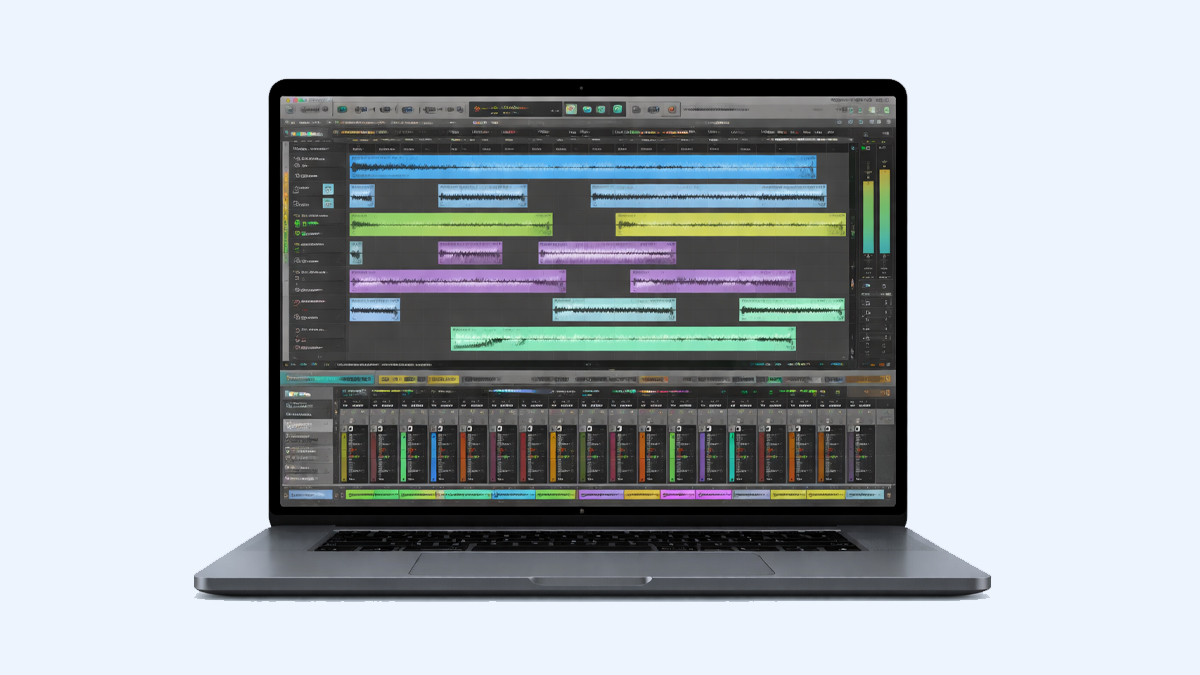
What is Digital Performer?
Digital Performer is a professional Digital Audio Workstation, often called a DAW, that helps people record, edit, arrange, mix, and produce music and audio projects on a computer. It is developed by MOTU, and it is widely used by musicians, composers, producers, audio engineers, and sound designers who want a powerful system for both audio recording and MIDI based composition. Digital Performer is known for combining detailed music production tools with strong features for film scoring, post production, and complex studio workflows.
At its core, Digital Performer works like a digital studio. You can connect microphones, instruments, and MIDI controllers, then capture performances as audio or MIDI data. After recording, you can edit timing, tuning, pitch, and dynamics, and you can build full arrangements using virtual instruments, sample libraries, and effects. Digital Performer also provides advanced routing, automation, and mixing tools, which makes it suitable for projects ranging from a single song to a full album or a long film soundtrack.
Who typically uses Digital Performer: Digital Performer is popular with composers who write for picture, bands that record in home studios, engineers working in professional studios, and educators who teach music production, because it supports detailed editing and structured project management.
What makes it a DAW: A DAW is a software environment that replaces or complements traditional recording studios by providing a timeline for audio and MIDI, tools for editing, mixing consoles, effects processing, and export options for final delivery.
How does Digital Performer Work? Step by Step Guide
Digital Performer works by organizing your project into tracks and sequences, capturing sound or MIDI information, and then letting you shape that material into a finished production. While every producer has a personal workflow, most projects follow a clear set of steps.
Step 1, setting up the project: You start by creating a new project and selecting settings such as sample rate and bit depth for audio quality, as well as choosing a tempo and time signature for musical structure. You can also set up markers and memory locations to keep the session organized.
Step 2, configuring audio and MIDI: You select your audio interface and define inputs and outputs so Digital Performer knows where sound will enter and leave your system. If you use MIDI controllers, you configure MIDI devices and choose virtual instruments so your keyboard or pads can trigger sounds inside the software.
Step 3, creating tracks: You add audio tracks for microphones and instruments, MIDI tracks for performance data, and instrument tracks for virtual instruments. You can also create auxiliary tracks for shared effects like reverb, and bus routing to manage groups such as drums or vocals.
Step 4, recording performances: You arm tracks for recording, set monitoring, and record audio or MIDI. Audio captures real sound as a waveform, while MIDI captures performance gestures such as note pitch, timing, and velocity, which can later control many different instrument sounds.
Step 5, editing and cleanup: After recording, you edit timing, remove noise, adjust takes, and correct mistakes. MIDI editing can refine rhythm and expression, while audio editing can tighten performances, remove unwanted sections, and improve clarity.
Step 6, arranging and composing: You build the song structure by arranging sections on the timeline, adding layers, and developing harmonies and melodies. For scoring, you can align cues to picture and shape transitions to match scenes.
Step 7, adding effects and processing: You insert effects such as equalization, compression, saturation, delay, and reverb. You can also use virtual instrument plugins and third party tools to expand sound choices.
Step 8, mixing and automation: You balance levels, pan instruments, shape tone, and control dynamics. Automation lets you change volume, effect levels, and plugin parameters over time to create movement and emotion.
Step 9, exporting and delivery: When the mix is ready, you export the final audio in formats like WAV or AIFF for high quality, or MP3 for sharing. For film and TV, you may deliver stems, alternate mixes, or synced files for post production.
What are the Components of Digital Performer?
Digital Performer includes several key components that work together to support recording, composition, and mixing. Understanding these parts makes the software easier to learn and helps you build a reliable workflow.
Project and session structure: A project is the overall container that holds sequences, audio files, MIDI data, mixing settings, and plugin choices. This structure keeps creative work organized and makes it easier to return later without losing decisions.
Tracks and timeline: Tracks are lanes where audio and MIDI live, and the timeline is where you arrange them across time. The timeline includes musical measures for rhythm based work and timecode for picture based work.
MIDI editor and piano roll: The MIDI editing tools let you adjust note start, note length, velocity, and controller data. This is essential for building precise performances with virtual instruments.
Audio editing tools: Audio tools allow cutting, trimming, crossfading, comping, time correction, and basic cleanup. These tools help turn raw recordings into smooth, professional takes.
Mixing console: The mixer provides channel strips with faders, pan controls, sends, inserts, and routing. It is the control center for balancing the sound and shaping tone across the project.
Effects and plugins: Digital Performer supports plugins that add sound processing and creative effects. You can use built in plugins and third party plugins, depending on your system and needs.
Virtual instruments and samplers: Instrument support lets you load synthesizers, drum machines, orchestral libraries, and other sound generators. These instruments can be played live or programmed through MIDI.
Automation system: Automation records and plays back changes to mixer and plugin settings. It helps create dynamic mixes where energy rises and falls naturally.
Scoring and notation tools: Digital Performer supports composition workflows that involve notation, conductor style tempo control, and cue management, which is valuable for composers and arrangers.
What are the Types of Digital Performer?
When people ask about types of Digital Performer, they often mean the different ways it can be used or the different production modes it supports. Digital Performer is one application, but it can behave like multiple tools depending on the project.
Audio recording focused use: In this type of workflow, Digital Performer acts like a multitrack recorder for vocals, guitars, drums, and live instruments. The priority is clean capture, take management, and efficient editing.
MIDI composition focused use: Here, Digital Performer is used mainly for writing music through virtual instruments. The workflow relies on MIDI editing, orchestration templates, and detailed performance shaping.
Film scoring and post production use: In this mode, Digital Performer supports timecode, tempo mapping, markers, and cue based organization. Composers can sync music to picture and deliver stems for post production.
Hybrid production use: Many modern producers combine audio recording with MIDI programming. Digital Performer supports hybrid sessions where live recordings and programmed instruments blend into one coherent mix.
Live playback and rehearsal use: Some creators use Digital Performer to run backing tracks, click tracks, or virtual instruments during rehearsals or performances, especially when stability and session organization matter.
What are the Applications of Digital Performer?
Digital Performer can be applied to many real world music and audio tasks. Its flexibility makes it useful across different genres and production environments.
Songwriting and arranging: Writers can sketch chord progressions, build beats, layer harmonies, and shape the structure of songs. MIDI tools help explore ideas quickly, while audio recording captures vocals and instruments naturally.
Studio recording: Digital Performer supports multitrack recording with routing and monitoring options that fit studio setups. Engineers can track bands, record voice overs, and capture acoustic instruments with precision.
Beat making and electronic music: Producers can build drum patterns, design synth sounds, and program automation for evolving textures. The combination of MIDI and audio editing supports modern production styles.
Film, TV, and game scoring: Digital Performer is often chosen for scoring because it can handle cue organization and syncing tasks. Composers can build large templates and keep scenes aligned through markers and tempo changes.
Podcast and spoken word production: Editors can clean dialogue, remove noise, balance loudness, and add music beds and sound effects. The timeline editing tools help shape speech for clarity and pacing.
Sound design and experimental audio: Sound designers can layer effects, manipulate audio, and automate plugin parameters to create cinematic textures, impacts, and transitions.
Music education and training: Teachers can use Digital Performer to demonstrate recording, MIDI composition, mixing, and arrangement. Students can learn the full production pipeline inside one environment.
What is the Role of Digital Performer in Music Industry?
Digital Performer plays a practical role in the music industry by providing a stable platform where music can be created, refined, and delivered in professional formats. It supports both creative work and the technical requirements of production and distribution.
Supporting professional production standards: Digital Performer helps producers meet industry expectations for audio quality, consistent session organization, and accurate exports. This matters when delivering tracks to labels, film teams, or streaming platforms.
Enabling independent music creation: Many independent artists produce music without a large studio budget. Digital Performer allows them to record at home, use virtual instruments, and create high quality mixes that compete in the marketplace.
Serving composers and media production: In film and TV environments, the role of a DAW extends beyond songs. Digital Performer supports composing to picture, managing cues, and delivering stems, which makes collaboration with editors and mixers easier.
Improving collaboration and revision workflows: Music projects often require revisions. A DAW that keeps sessions organized makes it easier to return to older versions, adjust arrangements, and export alternate mixes.
Bridging creativity and technology: The industry depends on tools that translate musical ideas into deliverable products. Digital Performer acts as the bridge between performance, composition, editing, and final production output.
What are the Objectives of Digital Performer?
Digital Performer is designed with clear objectives that support both music creation and professional delivery. These objectives explain why the software includes both creative features and technical controls.
Capture performances accurately: One main objective is to record audio and MIDI reliably, with timing accuracy and clean file management so sessions remain stable over time.
Enable detailed editing: Digital Performer aims to give users precise control over timing, pitch, dynamics, and arrangement. This helps turn good recordings into polished, release ready results.
Support creative composition: The software is built to help composers develop musical ideas using MIDI, virtual instruments, tempo control, and scoring tools that support complex musical structures.
Provide professional mixing tools: Digital Performer includes a mixer and automation system so users can balance tracks, shape tone, and build a final mix that translates well across speakers and headphones.
Help deliver industry ready exports: Another objective is to make exporting simple and accurate, including full mixes, stems, and formats that match professional requirements.
Maintain workflow efficiency: Digital Performer aims to help creators work faster through templates, track organization, shortcuts, and session management features that reduce repetitive tasks.
What are the Benefits of Digital Performer?
Digital Performer offers benefits that matter to beginners and professionals. These benefits are practical, meaning they influence how fast you can work, how good the final sound can be, and how confidently you can handle complex projects.
Strong balance of audio and MIDI: Many users value Digital Performer because it supports both audio recording and MIDI composition in a single workflow. This is useful for hybrid productions where live recordings and virtual instruments must feel unified.
Useful for film scoring workflows: Digital Performer is often praised for scoring friendly features such as tempo changes aligned to scenes, marker based organization, and the ability to manage cues and revisions effectively.
Detailed editing and arrangement control: The editing tools allow precise changes without damaging the creative flow. This helps producers tighten grooves, correct mistakes, and shape performances naturally.
Professional mixing capabilities: The mixing environment supports routing, effects processing, and automation. This makes it possible to build clear, punchy mixes with depth and movement.
Scalable for small or large projects: Digital Performer can handle a simple demo or a large template with many tracks. This scalability helps users grow without switching tools.
Reliable project organization: Good session structure reduces confusion and saves time, especially during revisions. Organized sessions also help when multiple people share files.
What are the Features of Digital Performer?
Digital Performer includes a wide range of features that support composition, recording, editing, and mixing. Features can be understood as the specific capabilities that make the software practical in daily use.
Multitrack audio recording: Digital Performer can record multiple audio sources at the same time, which is essential for bands, drum recording, and studio sessions.
MIDI sequencing and editing: The MIDI tools allow recording, programming, and editing performances with precision. This supports everything from simple beats to orchestral arrangements.
Virtual instrument hosting: Digital Performer can run software instruments so you can create full productions without external hardware. This expands sound choices and helps composers work efficiently.
Advanced time and tempo control: Tempo changes, conductor style control, and time alignment tools help music follow emotional shifts and match picture timing for scoring.
Audio comping and take management: Recording multiple takes and selecting the best parts is a common workflow. Digital Performer supports this so vocals and instruments can sound consistent and confident.
Mixing console with automation: The mixer provides channel processing and routing, and automation allows movement in volume, effects, and tone across the timeline.
Plugin support and effects processing: Effects can be inserted per track or used as shared sends. This supports clean mixes and creative sound design.
Export options for different deliveries: Digital Performer supports exporting full mixes and stems. This helps when sending projects to mastering, video teams, or clients.
What are the Examples of Digital Performer?
Examples help explain how Digital Performer is used in real situations. These examples are not limited to one genre or one workflow, because DAW use depends on the creator and the project goal.
Example for songwriting and demo creation: A singer songwriter can record a vocal and guitar, add a drum groove using MIDI, layer a bass line with a virtual instrument, and export a demo mix to share with collaborators.
Example for band recording: A rock band can record drums with multiple microphones, track guitars and bass through an audio interface, record vocals, then edit and mix everything into a release ready song.
Example for film cue composition: A composer can import video, place markers for scene changes, build an orchestral template with virtual instruments, map tempo changes to match the scene, and deliver stems for dialogue and effects mixing.
Example for podcast production: A podcast editor can remove unwanted pauses, clean background noise, balance loudness, add intro music and transitions, and export episodes for publishing.
Example for electronic music production: A producer can program drum patterns, automate synth filters, layer textures, record vocal chops, and build a dynamic arrangement with rising energy into the chorus.
What is the Definition of Digital Performer?
Digital Performer can be defined as a computer software application that functions as a Digital Audio Workstation for recording, editing, arranging, mixing, and producing audio and MIDI based music projects. It provides tools that simulate a complete production studio, including a timeline for sequencing, editors for detailed changes, and a mixer for final sound shaping.
Definition in practical terms: Digital Performer is a single workspace where you can take an idea from the first note to the final exported track, whether that idea is a song, a score, or an audio program.
What is the Meaning of Digital Performer?
The meaning of Digital Performer can be understood in two ways. First, it refers to the software product name. Second, it hints at what the software enables, which is the ability to perform and produce music digitally, using a computer as the main creative tool.
Meaning for musicians: For musicians, Digital Performer means a place to record performances, refine them, and create polished productions that match professional expectations.
Meaning for composers: For composers, Digital Performer means a structured environment for building detailed MIDI arrangements, controlling tempo and expression, and delivering music for media projects.
Meaning for producers and engineers: For producers and engineers, Digital Performer means access to editing, mixing, routing, and automation systems that help shape a finished sound with clarity and impact.
What is the Future of Digital Performer?
The future of Digital Performer is closely connected to broader changes in music production, including new creative workflows, smarter editing tools, and stronger integration with modern hardware and plugin ecosystems. While specific development directions depend on the software maker, the overall direction of DAWs is clear, and Digital Performer is likely to continue evolving in similar ways.
Continued improvement in workflow speed: Producers increasingly expect faster editing, better session organization, and smoother handling of large projects. Future versions of Digital Performer are likely to focus on efficiency, stability, and template based workflows.
Deeper integration with modern audio technology: As audio interfaces, controllers, and plugin formats evolve, Digital Performer will likely continue supporting improved performance, lower latency, and better compatibility with new devices.
Growth in composition and scoring features: Media scoring remains a major area where DAWs compete. Digital Performer is likely to strengthen tools that help composers manage cues, sync to picture, and deliver multiple versions quickly.
More intelligent editing assistance: Many modern tools are moving toward smarter features that help with timing correction, pitch control, and noise cleanup. Digital Performer may expand support for streamlined editing tools that reduce manual steps while still allowing precise control.
Better collaboration and file exchange: Collaboration is increasingly remote. The future may include improved ways to share sessions, manage versions, and exchange stems and project assets in more organized ways.
Expanded creative sound design options: Producers value unique sonic tools. Digital Performer may continue enhancing built in instruments and effects, and it will likely maintain strong plugin hosting to support third party innovation.
Summary
- Digital Performer is a professional Digital Audio Workstation used for recording, MIDI composition, editing, mixing, and production.
- It works through a step by step workflow that includes setup, recording, editing, arranging, processing, mixing, and exporting.
- Key components include tracks, timeline, MIDI and audio editors, mixing console, plugins, automation, and scoring focused tools.
- It supports multiple use styles such as audio recording, MIDI composition, film scoring, hybrid production, and live playback setups.
- Applications include songwriting, studio recording, electronic music, film and game scoring, podcast editing, sound design, and education.
- Its role in the music industry includes enabling professional delivery, supporting independent production, and helping composers and teams handle revisions.
- Main objectives include accurate capture, detailed editing, creative composition support, professional mixing, and reliable export options.
- Benefits include strong audio and MIDI balance, scoring friendly structure, scalable sessions, and organized workflows for complex projects.
- The future direction points toward faster workflows, modern tech integration, smarter editing assistance, stronger collaboration, and expanded creative tools.

