

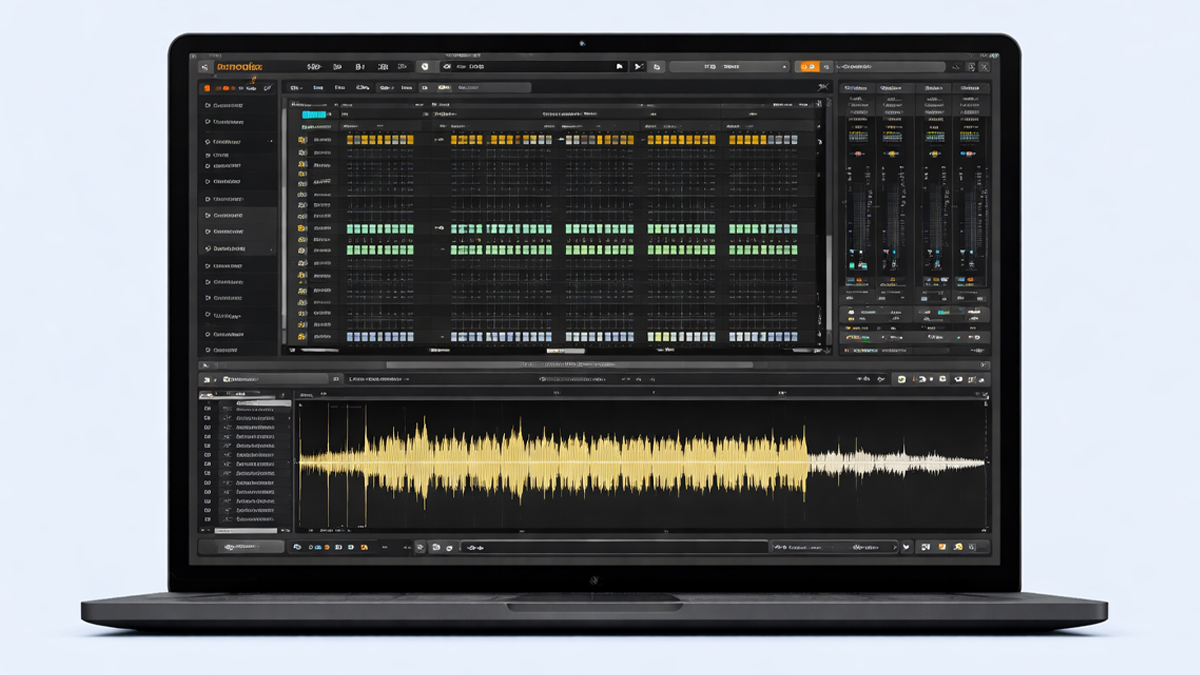
What is Renoise?
Renoise is a digital audio workstation that uses a tracker style workflow for music production. Instead of building songs mainly on a horizontal timeline like many DAWs, Renoise organizes musical events in vertical patterns made of lines and columns. Each line represents a step in time, and the columns hold notes, instrument commands, effect commands, and automation style values. This approach comes from the classic tracker tradition used in early computer music, but Renoise modernizes it with high quality audio processing, advanced sampling, strong MIDI support, plugin hosting, and a polished interface for professional work.
Renoise is popular with producers who enjoy precision and speed. When you type notes into a pattern, you are working with exact timing and clear event control. Many people find that this leads to tight drums, crisp edits, and fast experimentation. Renoise is also known for being lightweight and stable on many systems, while still offering deep features like modulation, slicing, time stretching, routing, and scripting through its API.
Another important point is that Renoise is not limited to one genre. While trackers are often associated with electronic music, chiptune, breakbeats, IDM, drum and bass, and experimental styles, Renoise can also be used for hip hop, pop, soundtrack production, and sample based composition. Its sampler is a core strength, and the program encourages a hands on, detailed relationship with sound.
How does Renoise Work? Step by Step Guide
Step 1: Set up the project and audio system: Renoise starts with configuring your audio driver, sample rate, buffer size, and input and output devices. This ensures low latency monitoring for recording and stable playback for mixing. You can also set the tempo, time signature, and pattern length according to the style of music you are making.
Step 2: Create or load instruments: In Renoise, instruments can be sample based or plugin based. You can load a sample into an instrument slot, record audio into it, or load a VST or AU plugin instrument if your system supports it. Each instrument can contain multiple samples, key zones, velocity layers, and modulation settings. This makes instruments flexible for drums, multisampled keyboards, and sound design.
Step 3: Build patterns in the pattern editor: The pattern editor is the heart of the tracker workflow. You enter notes on lines using your computer keyboard or a MIDI controller. Alongside notes, you can enter commands that affect playback, such as volume changes, panning changes, retriggering, glide, sample offsets, and effect values. Patterns are small musical building blocks that can be repeated, varied, and arranged into a full song.
Step 4: Organize patterns in the song sequence: The song sequence is where you place patterns in order. You can repeat a pattern multiple times, insert new patterns, and create structure like intro, verse, build, drop, and outro. Because patterns are separate units, you can quickly rearrange a track without losing the detailed work inside each pattern.
Step 5: Use tracks for layering and separation: Renoise tracks work like lanes for instruments and audio events. You can dedicate tracks to drums, bass, leads, pads, vocals, or effects. Each track can host its own effect chain, automation, and routing. You can also group tracks and use send tracks for shared reverbs and delays.
Step 6: Add effects and route audio: Renoise has built in effects such as EQ, compression, reverb, delay, distortion, chorus, phaser, and more. You can also load third party effects plugins. Effects can be placed on tracks, on send tracks, or on the master. Routing can be simple or advanced, allowing parallel processing, resampling, and creative feedback chains.
Step 7: Automate with envelopes and pattern commands: Automation in Renoise can be handled through automation lanes, envelope curves, and tracker commands inside patterns. You can automate plugin parameters, mixer levels, filter cutoffs, effect sends, and many other values. The combination of pattern based commands and continuous automation gives both precise and smooth control.
Step 8: Edit audio and samples with the sample editor: Renoise includes a strong sample editor for trimming, normalizing, looping, slicing, time stretching, pitch shifting, and detailed waveform work. You can map slices across keys for performance, create drum kits, or design evolving textures by layering samples inside a single instrument.
Step 9: Mix the track: Mixing in Renoise happens in the mixer view and track effect chains. You balance levels, shape tone with EQ, control dynamics with compression, add space with reverb and delay, and manage stereo placement. The routing options let you create professional mixing workflows similar to other DAWs.
Step 10: Export and render: When the song is ready, you can render the master output to audio formats, export stems, or render individual tracks for collaboration. You can also resample within Renoise to print creative processing, which is a powerful technique for sound design and arranging.
What are the Components of Renoise?
Pattern editor: This is the main tracker grid where notes, instruments, and commands are entered. It provides a clear step based view of timing and allows detailed event level control.
Song sequence: This is the arrangement area where patterns are placed in order. It helps you structure your track by repeating and organizing patterns into sections.
Instruments and instrument slots: Instruments hold samples or plugin instruments. They include settings for key mapping, modulation, envelopes, and sample layering.
Sample editor: This is where you record, trim, slice, loop, time stretch, and process samples. It is essential for drum programming, sampling, and sound design.
DSP effect chains: Each track can host a chain of effects. You can use built in effects or third party plugins. The order of effects matters, and you can automate parameters.
Mixer and routing: Renoise includes a mixer view for track levels, panning, sends, and groups. Routing options support send tracks, parallel chains, and advanced signal flow.
Automation system: Renoise supports automation for mixer parameters, effect parameters, and instrument parameters. Automation can be drawn or entered as pattern values.
Meta devices: Renoise includes special devices for modulation and control such as LFO, envelope followers, signal followers, and other tools that help create movement and dynamic sound.
MIDI and controller support: Renoise connects to MIDI keyboards, pads, and control surfaces. You can record notes, map knobs to parameters, and integrate hardware gear.
Rendering and export tools: Renoise can render full mixes, stems, and selected ranges. It also supports resampling within the project to transform sound creatively.
Scripting and extension system: Renoise allows scripting through a built in API. Users can create tools, custom workflows, and interface enhancements to speed up production.
What are the Types of Renoise?
Tracker based production type: This is the classic Renoise workflow where most composition happens in the pattern editor. Notes and commands are entered in steps, and patterns form the building blocks of the song.
Sample centric production type: This type focuses on chopping, slicing, and manipulating samples. Producers use the sample editor heavily, build instruments from samples, and sequence them with tight control.
Plugin and synth based production type: Renoise can act as a modern DAW hosting third party plugin instruments and effects. In this type, the tracker is used to sequence synth parts and automate plugin parameters.
Hybrid workflow type: Many producers combine sampling, plugins, and tracker commands. For example, drums may be sample based, bass may be a plugin synth, and textures may be resampled audio.
Live performance and pattern switching type: Some artists use Renoise for performance by switching patterns, muting tracks, triggering phrases, and using controller mappings. This emphasizes improvisation and arrangement in real time.
Sound design and resampling type: This type uses internal resampling, effect chains, and modulation to create new sounds. Producers render processed audio, slice it, and reuse it as fresh material.
What are the Applications of Renoise?
Electronic music production: Renoise is widely used to create drum driven electronic genres because of its precise sequencing, quick pattern editing, and sample workflow.
Beat making and drum programming: The pattern editor makes it easy to craft complex rhythms, rolls, fills, and micro variations. This is helpful for hip hop drums, trap patterns, and breakbeat edits.
Chiptune and retro game style music: Tracker workflows match the mindset of classic game music composition. Renoise also supports samples and plugins, allowing modern chiptune hybrids.
Soundtrack and score sketching: Renoise can be used to build cues with repeating motifs, layered textures, and percussion. Patterns help create variations quickly, which is useful when scoring to picture or building game loops.
Loop based production and remixing: Renoise is strong for looping and transforming audio. You can slice loops, reorder pieces, add effects, and create new grooves from existing material.
Sampling and collage composition: Producers can build songs from many short audio fragments. Renoise makes it easy to place, repeat, and alter these fragments with high precision.
Audio editing and cleanup: The sample editor helps with trimming, fades, clicks, and basic correction, which can be useful for preparing one shots and field recordings.
Live set preparation: You can build pattern based songs for performance, export stems, or prepare versions for DJs and live acts.
Education and learning music structure: Renoise teaches timing, pattern logic, arrangement discipline, and the relationship between notes and sound design. This can be valuable for beginners who like structured learning.
What is the Role of Renoise in Music Industry?
Renoise plays a specialized but meaningful role in the broader DAW ecosystem. While many producers use timeline based DAWs, Renoise serves artists who want maximum control of events and a fast, keyboard driven workflow. This makes it attractive for professional producers working in rhythm heavy styles and for sound designers who want tight edits.
One major role is enabling high precision sequencing. In many music production contexts, tight timing and repeatable variations are essential. Renoise makes it easy to create complex drum patterns, rapid note repeats, detailed velocity shaping, and command based effects that can be hard to program as quickly in other DAWs.
Another role is supporting sample based production at a professional level. Sampling is a major part of modern music, from pop to electronic to film. Renoise offers slicing, mapping, resampling, and fast manipulation that fit industry needs. Producers can build unique signatures by transforming audio, printing processing, and creating new samples.
Renoise also supports independent and experimental creators. Many underground labels, game audio composers, and electronic artists use Renoise because it encourages creative risk. The tracker format can inspire different musical thinking, leading to unusual rhythms, unexpected melodies, and innovative arrangements.
In collaborative environments, Renoise is often used as a composition and sound design tool. Producers may create ideas in Renoise, render stems, and then finalize in other environments, or they may complete full mixes inside Renoise. Its export options make it compatible with industry workflows.
Renoise contributes to the diversity of music tools. The music industry benefits from different creative interfaces because they produce different kinds of results. Renoise keeps the tracker tradition alive while bringing it into modern production, giving artists another powerful option for making music.
What are the Objectives of Renoise?
Efficient music creation: Renoise aims to help you create musical ideas quickly through a keyboard focused interface, pattern reuse, and fast navigation.
Precise event control: A major objective is giving detailed control over timing, notes, and effect values, down to the individual step, so you can craft tight rhythms and exact edits.
Strong sampling workflow: Renoise is designed to make sampling easy, deep, and creative, allowing you to record, slice, map, and resample audio within the same environment.
Flexible routing and processing: Renoise supports professional mixing techniques through effect chains, send tracks, grouping, and routing options.
Creative modulation and movement: Another objective is enabling dynamic sound through automation and modulation tools, helping you build evolving textures and expressive performances.
Stability and performance: Renoise is known for being efficient, aiming to run smoothly on many systems while supporting complex projects.
Customization and extension: Renoise encourages users to customize their workflow using scripts and tools, which helps different producers shape the program to match their process.
Compatibility with modern production: Renoise supports plugins, MIDI, and export formats so you can integrate it into modern music industry pipelines.
What are the Benefits of Renoise?
Fast workflow for experienced users: Once you learn the pattern editor, you can program drums, melodies, and variations very quickly without constantly reaching for the mouse.
High precision sequencing: The step based grid makes timing consistent and editing exact, which is excellent for tight electronic music and intricate rhythmic structures.
Powerful sampling and slicing: The sample editor and instrument system make it easy to turn raw audio into playable instruments and chopped kits.
Creative resampling: Renoise makes resampling simple. You can print processing into audio and then manipulate the result, which speeds up sound design.
Clean project organization: Patterns, instruments, and tracks are organized in a way that supports modular thinking, making it easier to manage variations and arrangements.
Lightweight and stable performance: Many users appreciate that Renoise can feel responsive even on modest systems, while still offering professional tools.
Unique creative perspective: The tracker approach encourages different musical thinking than timeline DAWs, which can help you break habits and develop a unique sound.
Deep control without clutter: Renoise packs complex features into a logical layout, and its keyboard shortcuts can reduce friction once learned.
What are the Features of Renoise?
Tracker style pattern editor: Notes and commands are entered in a vertical grid that emphasizes event level control and fast editing.
Phrase and pattern tools: Renoise supports phrases and reusable pattern elements, helping you create variations and manage repeated musical ideas.
Advanced instrument system: Instruments can contain multiple samples, layered mappings, modulation envelopes, and plugin instruments.
Sample editor with slicing: You can slice loops and map them across keys, making it easy to build drum kits and playable chopped instruments.
Time stretching and pitch shifting: Renoise includes tools for changing sample length and pitch, supporting modern sampling techniques.
DSP effect chains: Tracks can host chains of built in effects and plugin effects, allowing detailed sound shaping and mixing.
Automation lanes and pattern automation: You can automate parameters using curves or step values, combining smooth movement with precise control.
Meta devices and modulation: Devices like LFO and envelope follower style tools help you create dynamic changes without manual automation.
Flexible routing and sends: You can create send effects, groups, parallel processing, and custom routing for advanced mixing.
MIDI mapping and recording: Renoise supports MIDI input and controller mapping, which helps with performance and expressive recording.
Rendering and stem export: You can export full mixes, stems, and selected ranges, making collaboration easier.
Scripting API and tools: Users can extend Renoise with scripts that add functions, shortcuts, and custom workflows.
What are the Examples of Renoise?
Electronic drum and bass production example: A producer builds tight breakbeats by slicing a drum loop, rearranging slices in the pattern editor, and adding retrigger commands for rolls. Bass is programmed with a plugin synth, and automation controls filter movement across patterns.
Chiptune hybrid example: An artist uses short wave samples and tracker style note commands to create retro melodies, then adds modern effects like reverb and compression to make the track sound polished.
Hip hop sampling example: A beat maker chops a soul sample into slices, maps them across keys, and plays a new progression with a MIDI keyboard. Drums are layered from one shots, and the swing feel is created by adjusting timing and volume per step.
Experimental sound design example: A sound designer routes audio through distortion, reverb, and granular style processing, resamples the result, then slices the new texture into rhythmic pieces. The final track evolves through automation and modulation devices.
Game music loop example: A composer creates a looping background track using patterns, ensuring seamless transitions. Different pattern variations are arranged for in game states, and stems are exported for interactive audio implementation.
Live performance example: A performer organizes patterns for sections of a set, uses track mutes and pattern switching to improvise, and maps a controller to key parameters like filter cutoff, delay send, and master effects.
What is the Definition of Renoise?
Renoise is a digital audio workstation that uses a tracker based pattern system to sequence musical notes, samples, and effect commands, while also supporting modern features such as plugin hosting, automation, sampling, mixing, and audio rendering for professional music production.
What is the Meaning of Renoise?
The meaning of Renoise, in a music production context, is a modern tracker style DAW that helps you create, edit, and arrange music through patterns and precise event control. It represents an approach to production where musical data is entered as steps and commands, giving you a detailed, structured way to shape rhythm, melody, and sound design.
What is the Future of Renoise?
The future of Renoise will likely continue along two connected paths. One path is keeping the tracker workflow strong and accessible for modern producers. As music production trends shift, there will still be a demand for tools that provide speed, precision, and unique creative thinking. Renoise fits that demand because it offers a different interface that can inspire new ideas, especially for rhythm focused genres and sample based composition.
The second path is deeper integration with modern production needs. Producers increasingly rely on plugins, advanced automation, improved time based editing, and efficient exporting for collaboration. Renoise already supports many of these, and future development can expand performance optimization, workflow refinement, and creative tools that help producers move faster from idea to finished track. Community driven scripting and tools can also play a bigger role, since customization is one of Renoise strengths.
Another likely direction is stronger use in hybrid setups. Many musicians combine hardware synths, controllers, and external effects with software. Renoise can continue improving hardware integration, MIDI workflows, and routing so it remains useful in studio and live environments. As more creators search for unique sounds and fast workflows, Renoise can remain a respected choice that stands apart from the standard timeline approach.
Summary
- Renoise is a tracker style digital audio workstation built for precise, pattern based music production.
- It works by combining instruments, patterns, and a song sequence to build full arrangements efficiently.
- Key components include the pattern editor, sample editor, instrument system, mixer, effects, automation, and routing.
- Renoise supports multiple workflow types such as sampling focused, plugin based, hybrid production, and performance setups.
- It is used for electronic music, beat making, chiptune, soundtracks, remixing, sampling, and sound design.
- In the music industry, Renoise offers a unique creative interface that supports fast, detailed sequencing and professional audio results.
- Its objectives include speed, precision, sampling depth, flexible processing, stability, and customization.
- Benefits include tight timing, rapid editing, strong slicing and resampling, organized arrangement, and a fresh way to think about music.
- Core features include tracker patterns, advanced instruments, slicing, automation, modulation devices, plugin support, routing, and exporting.
- The future of Renoise likely focuses on refining the tracker experience while expanding modern integration and hybrid workflows.

