

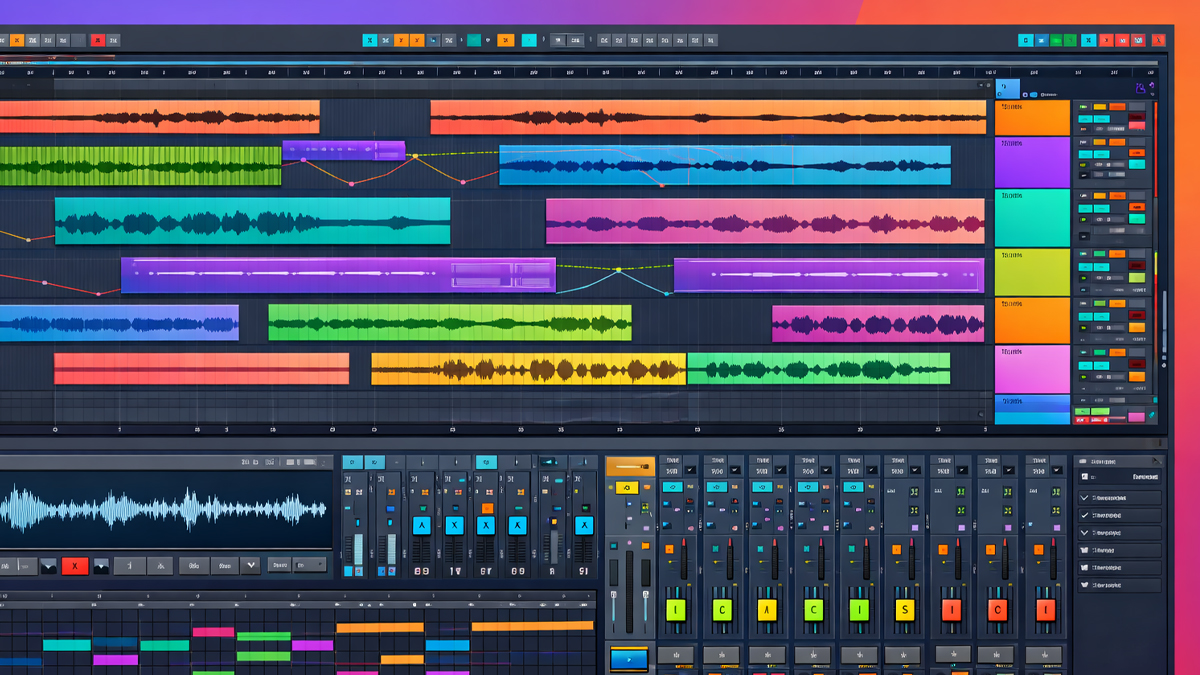
What is DAWs Arrangement View?
DAWs Arrangement View is the main timeline-based workspace inside a Digital Audio Workstation where you build a complete piece of music from start to finish. It is the place where musical ideas turn into a structured song, soundtrack, podcast, or any other audio production. In Arrangement View, time usually runs from left to right, tracks are stacked vertically, and you place audio clips, MIDI clips, automation, and markers along the timeline.
Think of it as a digital version of a multitrack tape studio combined with a music notation of time. Instead of working with physical tape, you work with clips that you can move, copy, cut, stretch, and edit. Instead of relying on manual hardware moves, you can automate changes in volume, panning, effects, and instrument parameters across time.
Arrangement View is used in almost every genre and workflow. Whether you record vocals and guitars, program drums and synths, or design sound effects, this view helps you organize everything into sections such as intro, verse, chorus, bridge, and outro. It also helps you align all parts precisely so the final output sounds intentional, balanced, and professional.
A key point is that Arrangement View focuses on the full linear journey of a track. It is built for building a complete timeline, not only experimenting with short loops. Some DAWs also include other views for sketching ideas, but Arrangement View is where the final structure is typically created and refined.
How does DAWs Arrangement View Work?
Arrangement View works by combining three core ideas: tracks, time, and events. Tracks hold your musical or audio material. Time is displayed as a grid, usually based on bars and beats for music, and minutes and seconds for audio timing. Events are the clips and automation points that you place onto tracks.
Here is the typical workflow inside Arrangement View:
Set the project tempo and time signature
- You choose the BPM and meter to match the style of your song or production.
- This defines how the grid aligns with your musical timing.
Create and organize tracks
- Audio tracks for recorded sounds such as vocals, guitars, and Foley.
- MIDI or instrument tracks for virtual instruments such as synths, pianos, and drums.
- Auxiliary or bus tracks for grouped processing such as drum bus or vocal bus.
Add material to the timeline
- Record audio directly into a track or import audio files.
- Record MIDI notes or draw them into MIDI clips.
- Drag loops or samples into position.
Edit for timing and performance
- Trim clip edges, split clips, and move parts to fit the groove.
- Quantize MIDI or audio timing when needed.
- Use time stretching or warping to match tempo.
Arrange sections into a full structure
- Duplicate, reorder, and vary parts to form a complete song.
- Add transitions, fills, risers, and breakdowns.
Automate changes across time
- Write automation for volume rides, filter sweeps, reverb throws, and effect bypass.
- Use automation lanes to draw curves and points.
Mix and refine
- Balance levels and panning.
- Apply EQ, compression, reverb, delay, and saturation.
- Use sends, buses, and sidechain techniques if needed.
Finalize and export
- Add markers for sections and final checks.
- Export a stereo mix or stems.
Arrangement View is powerful because it supports both creativity and precision. You can stay musical with loops and sections, but you also have detailed control over every moment in the timeline.
What are the Components of DAWs Arrangement View
Different DAWs use different names, but the core components of Arrangement View are very similar. These parts work together to help you build, edit, and finalize a project.
Timeline and ruler
- Shows bars and beats, and often seconds and minutes.
- Lets you navigate quickly to any point.
- Supports loop regions, punch in and punch out, and selection ranges.
Tracks
- Vertical lanes that hold clips and automation.
- Common track types include audio, MIDI, instrument, return, bus, and master.
Clips or regions
- Audio clips contain recorded or imported audio.
- MIDI clips contain note data that triggers instruments.
- Regions can be looped, consolidated, duplicated, and rearranged.
Grid and snapping
- Grid lines align to musical divisions such as bars, beats, and subdivisions.
- Snapping helps clips lock to the grid for clean timing.
- Many DAWs allow switching between snap and free movement.
Playhead and transport controls
- The playhead shows the current playback position.
- Transport includes play, stop, record, loop, metronome, and tempo controls.
Editing tools
- Selection tool, split tool, trim tool, fade tool, and draw tool.
- Slip editing and ripple editing options in many DAWs.
- Crossfades for smooth audio transitions.
Mixer access and channel controls
- Volume, pan, mute, solo, record arm.
- Inserts for effects plugins.
- Sends to reverbs and delays.
- Routing to buses and outputs.
Automation lanes
- Separate lanes under each track or layered view.
- Automation for volume, pan, plugin parameters, and instrument controls.
- Modes such as read, write, latch, and touch in many DAWs.
Markers and arrangement sections
- Markers label song parts such as intro, verse, chorus.
- Arrangement tracks or section tools help reorder the song quickly.
Zoom and navigation tools
- Horizontal zoom for time detail.
- Vertical zoom for track height.
- Scroll, overview map, and track visibility controls.
Together, these components form the environment where you shape the complete production.
What are the Types of DAWs Arrangement View
The phrase Arrangement View often points to a linear timeline, but DAWs offer different versions of that concept. The types below describe how Arrangement View can be presented and how it behaves.
Linear multitrack timeline view
- The classic arrangement style used in many DAWs.
- Tracks stacked vertically, time left to right.
- Strong for recording, editing, and mixing full songs.
- Common in Pro Tools style workflows and many studios focused DAWs.
Playlist or track lane-based arrangement view
- Like linear view, but with special lanes for takes and comping.
- Often includes multiple lanes per track for alternative recordings.
- Strong for vocal comping, guitar takes, and dialogue editing.
Pattern to timeline hybrid arrangement view
- Uses patterns or blocks that reference a separate editor.
- You place patterns on a timeline to form the song.
- Efficient for beat making and electronic music where patterns repeat.
- Many producers enjoy it because changing the pattern updates all instances.
Clip based arrangement timeline
- Clips are treated as flexible blocks that can be looped and stretched quickly.
- Often integrates warping or time stretching deeply.
- Strong for remixing, live recorded loops, and fast arrangement building.
Marker driven arrangement systems
- Uses sections and markers as a high-level structure layer.
- Allows moving whole sections without manually selecting every clip.
- Useful for fast restructuring after feedback or client changes.
Audio post and video aligned arrangement view
- Enhanced timeline tools for film and broadcast.
- Timecode display, video window, spotting, and sync options.
- Strong for sound design, dialogue editing, and scoring.
A single DAW can include more than one of these styles, but nearly all of them provide a timeline where the final piece is assembled.
What are the Applications of DAWs Arrangement View
Arrangement View is used anywhere audio needs to be structured over time. Below are common real-world applications.
Music production
- Building a full song structure from a loop or sketch.
- Creating builds, drops, breakdowns, and transitions.
- Recording vocals, guitars, and live instruments on separate tracks.
Beat making and electronic music
- Turning patterns and loops into complete tracks.
- Automating effects for energy changes.
- Layering drums, bass, synths, and textures.
Mixing and mastering preparation
- Organizing tracks for mixing.
- Creating automation for dynamics and movement.
- Preparing stems and alternate versions.
Sound design
- Creating evolving textures and impacts.
- Aligning sound effects with key moments.
- Using automation to control filters, pitch, and spatial effects.
Film, TV, and game audio
- Syncing audio to video or gameplay cues.
- Building ambience beds and foley layers.
- Managing timecode and markers for scenes.
Podcast and spoken word
- Editing dialogue and removing mistakes.
- Adding music beds and transitions.
- Automating loudness changes for clarity.
Live show preparation
- Creating backing tracks with precise cues.
- Building stems for live mixing.
- Preparing click tracks and guide tracks.
In each case, Arrangement View is the workspace that makes a long piece manageable, editable, and repeatable.
What is the Role of DAWs Arrangement View in Music Industry
In the music industry, Arrangement View is the bridge between creativity and deliverables. A great idea is valuable, but the industry needs finished outputs: songs released on streaming platforms, radio edits, sync ready cues, stems for live shows, and mixes for film and advertising. Arrangement View supports that entire chain.
Turning ideas into finished songs
Many producers start with a loop, a chord progression, or a beat. Arrangement View helps extend that idea into a full narrative. It allows you to control energy over time, create contrast between sections, and keep the listener engaged.
Supporting collaboration
Modern music is often made by teams across locations. Arrangement View helps by:
- Keeping sections labeled clearly with markers.
- Providing a shared timeline that collaborators understand.
- Allowing exports of stems and session files for other engineers.
Speed and revision handling
Artists, labels, and clients often request changes:
- Shorten the intro.
- Add a breakdown.
- Make the chorus hit earlier.
Arrangement View makes these revisions practical because you can move sections and adjust transitions quickly.
Professional editing and mixing standards
Industry level results depend on editing accuracy:
- Clean vocal timing and comping.
- Tight drum alignment.
- Controlled automation rides.
Arrangement View is where those details are implemented.
Consistency across deliverables
The industry often needs multiple versions:
- Radio edit, extended mix, instrumental, acapella, clean version.
Arrangement View helps create and manage these versions by duplicating the arrangement and adjusting sections.
Overall, Arrangement View is not just a screen in a DAW. It is a central production environment that supports professional creation, feedback cycles, and final delivery.
What are the Objectives of DAWs Arrangement View
Arrangement View is designed with clear objectives that match real production needs.
- Provide a linear timeline for building a complete piece: Help users create a beginning, middle, and end.
- Support precise editing: Enable sample level cuts, fades, and alignment.
- Make layering and organization easy: Allow stacking many tracks without confusion.
- Enable musical timing control: Offer grid-based placement, quantization, swing, and tempo mapping.
- Allow automation of changes over time: Make volume rides, effect changes, and instrument movement possible.
- Improve workflow efficiency: Provide shortcuts, duplication tools, and section management.
- Support professional output formats: Enable exports of mixes, stems, and session data.
- Maintain creative flexibility: Let users try multiple arrangement ideas without destroying earlier work.
These objectives explain why Arrangement View remains the main workspace for finishing projects.
What are the Benefits of DAWs Arrangement View
Arrangement View offers benefits that directly improve both creativity and technical quality.
Better song structure and storytelling
- Helps you plan sections and transitions clearly.
- Makes it easier to shape energy and pacing.
- Supports arrangement decisions that keep listeners engaged.
Faster editing and cleanup
- Quick cut, trim, crossfade, and comp tools.
- Fix timing issues without rerecording.
- Improve tightness and clarity across tracks.
Stronger mixing control
- Automation creates movement and emotion.
- Visual alignment helps spot clashes and gaps.
- Routing and grouping help manage complex sessions.
Reuse and variation
- Duplicate sections to build verses and choruses fast.
- Create variations by changing only certain layers.
- Build alternate versions for different release needs.
Improved collaboration
- Clear timeline makes communication easier.
- Markers and track names help others understand the project.
- Stems and consolidated exports simplify sharing.
Greater creative experimentation
- Try different song orders.
- Swap instrument layers.
- Test drops, breakdowns, and builds without starting over.
These benefits make Arrangement View essential for both beginners and professionals.
What are the Features of DAWs Arrangement View
Features vary across DAWs, but most Arrangement Views include a set of powerful capabilities. Understanding them helps people learn faster and work smarter.
Timeline features
- Bar and beat ruler plus time-based ruler.
- Loop region for repeating playback.
- Tempo changes and time signature changes.
- Marker tracks and arrangement sections.
Clip handling features
- Drag and drop placement.
- Clip duplication and repeating.
- Consolidate or glue to create a single continuous region.
- Audio time stretching and pitch shifting tools.
- MIDI clip editing with piano roll access.
Editing features
- Nondestructive editing so original files remain safe.
- Split, trim, slip, and nudge operations.
- Crossfades and fade handles for smooth transitions.
- Comping tools with take lanes for best performance selection.
Track and mixer features
- Mute, solo, record enable.
- Track grouping and folder tracks.
- Bus routing and submixes.
- Inserts and sends for effects processing.
Automation features
- Automation lanes per track.
- Automation for volume, pan, sends, and plugin parameters.
- Editing tools for curves, points, and ramps.
- Automation modes such as read and write in many DAWs.
Arrangement and workflow features
- Track templates and project templates.
- Color coding and track icons for organization.
- Track visibility management to reduce clutter.
- Versioning or snapshots in some workflows.
These features turn Arrangement View into a complete production and editing environment.
What are the Examples of DAWs Arrangement View
Different DAWs use different names, but they refer to a similar timeline-based workspace. Here are well known examples:
- Ableton Live: Arrangement View is the linear timeline where clips from the session can be recorded or placed for a full song structure.
- FL Studio: Playlist acts as the arrangement timeline where patterns and audio clips are placed to build the track.
- Logic Pro: Tracks area is the main arrangement timeline for MIDI and audio regions, with strong comping and automation tools.
- Pro Tools: Edit window is the core timeline for recording, editing, and mixing, widely used in studios and post production.
- Cubase: Project window provides a detailed arrangement timeline with advanced MIDI tools and scoring options.
- Studio One: Arrange view focuses on fast drag and drop workflows, arrangement sections, and integrated mastering options.
- Reaper: Arrange view is highly customizable and efficient for both music and post production workflows.
- Bitwig Studio: Arranger timeline supports clip-based creativity and deep modulation with a linear structure for finishing.
These examples show that Arrangement View is a common foundation across the DAW world, even when naming and workflow details differ.
What is the Definition of DAWs Arrangement View
DAWs Arrangement View is a timeline-based interface within a Digital Audio Workstation where audio and MIDI content is placed on tracks across time to create, edit, automate, and finalize a complete musical or audio production.
This definition highlights four essential parts:
- Timeline based structure
- Track based organization
- Placement of audio and MIDI events
- Editing and automation for a finished result
What is the Meaning of DAWs Arrangement View
The meaning of DAWs Arrangement View, in practical terms, is the place where a project becomes a complete journey. It is where you decide what happens first, what repeats, what changes, and what ends. It is also where you shape emotion and impact through timing, layering, and automation.
If a loop is a raw idea, Arrangement View is the blueprint and the construction site. It helps you answer questions such as:
- When should the vocals enter?
- How long should the intro be?
- When should the drums drop out for contrast?
- Where should the chorus feel bigger?
- How can the ending feel satisfying?
So the meaning is not only technical. It is also creative and musical because it supports storytelling through sound.
What is the Future of DAWs Arrangement View
The future of DAWs Arrangement View will likely focus on faster creation, smarter assistance, deeper integration with other media, and more flexible workflows. Below are trends that are already visible and likely to grow.
Smarter editing assistance
- DAWs are improving tools that detect tempo, transients, and pitch more accurately.
- Future systems may suggest cleaner edits, better crossfades, and timing fixes automatically while keeping user control.
More advanced arrangement tools
- Section based arrangement tracks will become more powerful, allowing instant restructuring.
- DAWs may offer more intelligent variation tools, helping create alternate choruses, bridges, or builds from existing material.
Better collaboration features
- Cloud based collaboration and version management will likely become smoother.
- Arrangement View may include clearer change tracking, comments, and merge style workflows for teams.
Improved audio warping and time stretching quality
- Higher quality real time stretching will make it easier to combine recordings and loops without artifacts.
- Tempo mapping tools will become simpler for beginners and more accurate for professionals.
Deeper integration with immersive audio
- As spatial audio and immersive formats grow, Arrangement View may include clearer timeline tools for object movement and 3D positioning automation.
- Visual feedback for space and motion may become more common.
More unified views for sketching and finishing
- Some DAWs separate idea sketching and final arrangement.
- Future workflows may blend both more seamlessly so users can move from experimenting to finalizing with fewer steps.
The core concept of a linear timeline will remain, because people still need a clear start to end structure. But the tools around it will likely become faster, smarter, and more connected.
Summary
- DAWs Arrangement View is the timeline based workspace where audio and MIDI are organized into a complete production from beginning to end.
- It works through tracks, a time grid, clips or regions, and automation that changes sound across the timeline.
- Key components include the timeline ruler, tracks, clips, editing tools, automation lanes, markers, and mixer controls.
- Types include classic linear timelines, take lane playlists, pattern hybrid timelines, clip focused timelines, and post production video aligned timelines.
- Applications cover music production, recording, mixing preparation, sound design, film and game audio, podcasts, and live show track building.
- In the music industry, it supports finishing songs, handling revisions, collaboration, and delivering multiple professional versions.
- Objectives include enabling full structure building, precise editing, automation, efficient workflow, and reliable exporting.
- Benefits include better song storytelling, faster editing, stronger mixing control, easier reuse and variation, and improved collaboration.
- Features commonly include non destructive editing, time stretching, comping, routing, grouping, and detailed automation editing.
- Examples across popular DAWs include Ableton Live, FL Studio, Logic Pro, Pro Tools, Cubase, Studio One, Reaper, and Bitwig Studio.
- The future will likely bring smarter assistance, stronger section tools, better collaboration, higher quality stretching, and deeper immersive audio support.

