

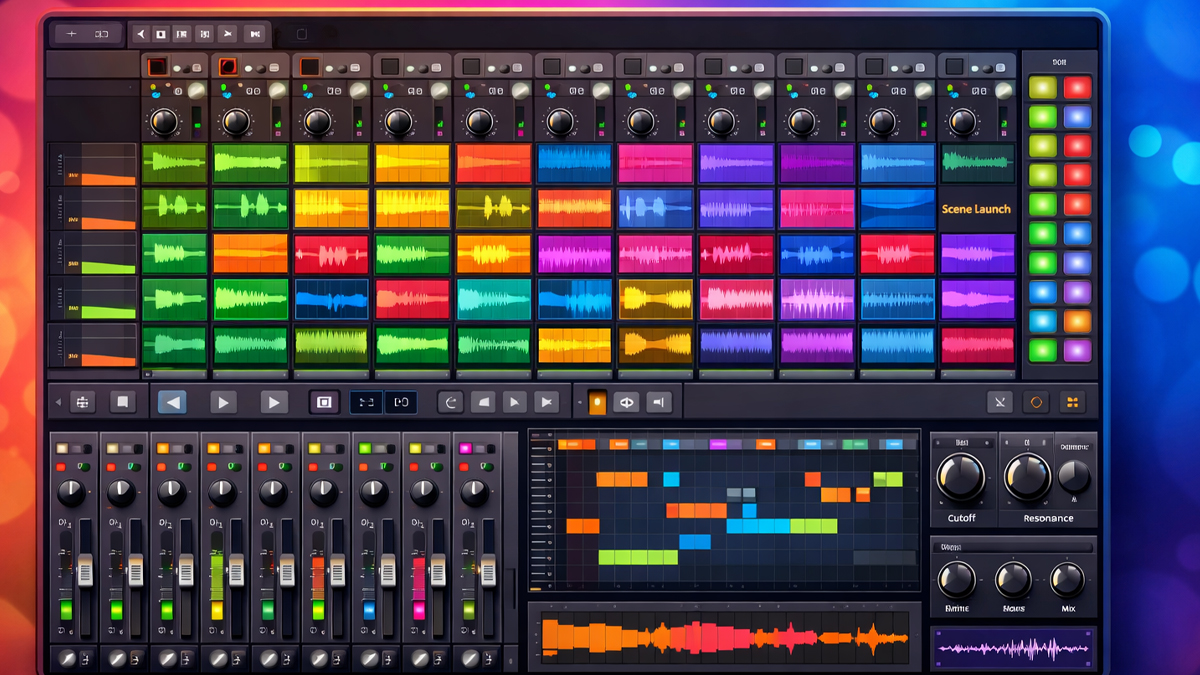
What is DAWs Clip Launcher?
A DAWs Clip Launcher is a part of a digital audio workstation that lets you trigger short pieces of music on demand. These pieces are called clips. A clip can be an audio recording, a MIDI pattern, a drum loop, a chord progression, a vocal phrase, a sound effect, or even automation data. Instead of placing everything on a long timeline first, you keep clips ready like building blocks and launch them when you want.
Think of a clip launcher as a performance friendly workspace inside a DAW. It is designed for speed, experimentation, and live control. You can try different musical ideas in real time, switch between sections instantly, and build arrangements by combining clips in new ways. This is why clip launching is popular in electronic music, hip hop, film scoring sketching, remixing, and live shows.
A clip launcher usually displays clips in a grid. One direction often represents tracks, such as drums, bass, synth, vocals. The other direction represents musical sections, such as intro, verse, chorus, bridge. You can launch a single clip, or launch a whole row of clips together as a scene. This makes it easy to move from one section to another with one action.
In simple terms, a DAWs Clip Launcher is a creative control center that helps you start, stop, and combine musical parts quickly, without being locked into a fixed timeline.
How does DAWs Clip Launcher Work?
A DAWs Clip Launcher works by storing clips in slots and triggering playback using rules that keep everything musically aligned. When you press a clip, the DAW does not always play it instantly. Instead, it can wait for the next musical point, such as the next bar or beat, so the clip enters smoothly in time.
Here is the basic flow:
You create or import clips: You record audio, draw MIDI notes, drag loops from a library, or capture ideas from an instrument. Each idea becomes a clip stored in a slot.
You set timing and sync behavior: The clip launcher uses tempo and bar measures. Clips can be warped or time stretched so they match the project tempo. MIDI clips naturally follow tempo because they control instruments rather than fixed audio.
You choose a launch quantization value: Quantization is the waiting rule that decides when a clip starts after you trigger it. Common values include 1 bar, 1 beat, or 1 eighth note. With quantization, you can launch clips freely while staying tight and rhythmic.
You trigger clips and scenes: You click a clip, press a key, use a MIDI controller pad, or automate triggers. You can also trigger a scene, which launches multiple clips at once across tracks, creating a full musical moment.
The DAW manages looping and transitions: Many clips loop automatically. When you launch a new clip in the same track, the old one can stop, fade out, or switch at the next quantized point. This prevents messy overlaps and keeps transitions clean.
You capture the performance into an arrangement: Many DAWs let you record clip launching into a timeline. This means you can improvise with clips, then turn that improvisation into a structured song arrangement.
So, the clip launcher is both a sketchpad and a performance engine. It encourages a play first approach, then lets you convert that play into a finished track.
What are the Components of DAWs Clip Launcher
A DAWs Clip Launcher is built from several core components that work together to make launching musical ideas easy and reliable.
Clip slots: Clip slots are the containers where clips live. Each slot can hold an audio clip or a MIDI clip. Empty slots are available so you can quickly add new ideas.
Clips: Clips are the actual musical data. Audio clips contain recorded sound. MIDI clips contain note and control information that drives instruments. Clips often include start and end points, loop settings, and gain controls.
Tracks: Tracks are vertical lanes that represent instruments or sound sources. A track can hold many clips across different slots, but typically only one clip plays at a time per track, depending on the DAW settings.
Scenes or rows: A scene is a horizontal row of clips that represents a musical section. Launching a scene triggers all clips in that row, helping you jump between sections like intro to chorus.
Launch controls: Launch controls include buttons, mouse clicks, keyboard shortcuts, and MIDI mappings. Many producers map launch buttons to a pad controller for hands on performance.
Quantization settings: Quantization settings control when a triggered clip starts. This keeps transitions musical and tight. There can be global quantization plus per clip overrides.
Tempo and time signature: The clip launcher depends on a project tempo and time signature. Audio clips may use warping or stretching so they stay synced.
Follow actions or playback rules: Some systems allow follow actions, where one clip automatically triggers another after a set time. This supports generative arrangements and hands-free performance flow.
Monitoring and metering: Meters show levels per track so you can mix while performing. Monitoring options let you hear input signals and manage latency.
Recording and capture: Recording tools let you capture a clip performance into a timeline, or record new clips directly into empty slots while the music is running.
These components turn the clip launcher into a flexible music engine that supports both creativity and structure.
What are the Types of DAWs Clip Launcher
Clip launching can appear in different forms depending on the DAW and the workflow design. Here are common types.
Grid based clip launcher
This is the classic style where clips are arranged in a matrix. Tracks run vertically, scenes run horizontally. This design is great for live performance and fast experimentation.
Scene focused clip launcher
Some workflows emphasize scenes more than individual clips. The user thinks in sections, and launches full rows to move the song forward. Individual clip launching still exists but the focus is on section switching.
Clip launcher with hybrid timeline integration
In this type, the clip launcher is tightly connected to the arrangement timeline. You can drag clips from the launcher into the timeline, or record live triggering into the timeline with minimal effort. It supports a smooth path from sketch to final arrangement.
Performance mode clip launcher
Some DAWs provide a performance mode that behaves like a clip launcher even if the main DAW is timeline based. This mode is optimized for launching loops, triggering patterns, and controlling transitions live.
Hardware integrated clip launcher
In this type, the clip launcher is designed around hardware control. Pads, faders, knobs, and screens give direct access to launching, mixing, and effects. The software layout and features may prioritize controller mapping and tactile performance.
Pattern and clip hybrid launcher
Some systems blend step sequencer patterns with clips. You can launch drum patterns, melodic patterns, and audio loops together. This is useful for beatmakers who want both clip launching and pattern editing in one space.
Each type serves the same purpose, fast musical triggering, but the emphasis can shift between live performance, composition, or arrangement building.
What are the Applications of DAWs Clip Launcher
A DAWs Clip Launcher is useful in many real-world music tasks. Below are practical applications where it shines.
Live performance
Artists can launch drums, basslines, chords, and vocals in real time. They can remix their own songs on stage, extend sections, and respond to the crowd. With quantized launching, transitions remain tight even under pressure.
Songwriting and composition
Instead of committing to a timeline early, you can explore ideas quickly. You can try different chord progressions, drum grooves, and melodies by swapping clips. This supports creativity without overthinking structure too soon.
Arrangement prototyping
Scenes can represent intro, verse, chorus, drop, and breakdown. You can create multiple versions of each section and test combinations. Once you like the flow, you can record the performance or drag clips into the timeline.
Remixing and mashups
Clips make it easy to combine parts from different songs or stems. You can trigger vocal chops, drum loops, and instrumental sections to build a remix quickly, then refine it into a final arrangement.
Sound design and experimentation
You can load variations of a sound into multiple clips, then launch them to compare quickly. You can also automate effects per clip to create evolving textures.
DJ style sets with original material
A clip launcher can act like a live set workstation. You can prepare clips and scenes like a set list, then launch them in sequence, while still having freedom to improvise.
Rehearsal and practice
Bands and solo performers can rehearse transitions, test tempos, and practice live arrangements. You can also run backing tracks and click tracks as clips.
Education and teaching
Teachers can demonstrate arrangement concepts by launching scenes. Students can understand structure, layering, and dynamics faster when they can hear instant changes.
These applications show that clip launching is not only a feature, it is a full workflow that supports modern music creation and performance.
What is the Role of DAWs Clip Launcher in Music Industry
The role of a DAWs Clip Launcher in the music industry is to make music creation and performance faster, more flexible, and more interactive.
In production studios, clip launching helps producers generate ideas quickly. Many modern genres rely on loops, grooves, and repeating sections. A clip launcher fits this reality by letting producers build tracks from interchangeable parts. This can reduce time spent on early arrangement decisions and increase time spent exploring creative possibilities.
In live music, clip launching has changed what a solo performer can do on stage. One person can manage many layers, instruments, and transitions. The clip launcher becomes a real time band, where clips replace or support musicians. This is especially important in electronic music, pop backing tracks, hip hop live sets, and hybrid bands that mix instruments with programmed elements.
In content creation, clip launching supports fast production for social media, advertising, and media scoring. Creators can keep libraries of clips and build cues quickly by launching and recording variations.
In collaboration, clip launching can make sharing ideas easier. A producer can send a project where sections are organized as scenes. Another collaborator can explore the same material in different orders, leading to new versions and remixes.
Overall, the clip launcher supports the industry need for speed, adaptability, and performance ready production.
What are the Objectives of DAWs Clip Launcher
The objectives of a DAWs Clip Launcher are the main goals it is designed to achieve.
- Enable real time triggering of musical ideas: The clip launcher lets you start and stop clips instantly, giving you performance level control.
- Keep musical timing tight: Quantized launching and tempo sync help maintain clean transitions and rhythmic accuracy.
- Support experimentation without risk: You can try combinations quickly without destroying a timeline arrangement. This encourages creativity.
- Speed up the songwriting process: By working with reusable clips, you can build sections faster and move ideas forward.
- Provide a bridge between improvisation and arrangement: You can jam with clips first, then record that jam into a structured timeline.
- Improve workflow for loop-based genres: Many modern styles are built from loops and patterns. Clip launching matches that working style.
- Expand performance possibilities: The objective is also to turn the DAW into an instrument that can be played live.
These objectives explain why clip launching is more than a convenience. It is a workflow philosophy built into the DAW.
What are the Benefits of DAWs Clip Launcher
A DAWs Clip Launcher offers clear advantages for producers, composers, and performers.
Faster creative flow: You can build a groove in minutes by launching drums, bass, and chords. You can keep momentum because you do not need to place everything on a timeline first.
Better experimentation: You can test different versions of a section. For example, you can try three basslines under the same drums by launching different bass clips. This makes creative decisions easier because you can hear options immediately.
Stronger live control: Clip launching supports live sets and studio jams. You can change structure on the fly, extend a chorus, or switch to a breakdown when it feels right.
Cleaner transitions: Quantization reduces timing mistakes. Clips start at musical boundaries, keeping the performance tight.
Easy arrangement building: After improvising with clips, you can record the performance into an arrangement view. This turns spontaneous ideas into a structured song.
Reuse and variation: Clips are reusable building blocks. You can duplicate, edit, and create variations quickly, which helps when producing multiple tracks or alternate versions.
Improved collaboration: Organized clips and scenes make it easier for collaborators to understand the project structure. They can also experiment with new arrangements without breaking the original.
Useful for learning music structure: Because scenes represent sections, the clip launcher can help new producers understand song form, layering, and energy management.
These benefits are why many creators feel that clip launching makes music making more playful and productive.
What are the Features of DAWs Clip Launcher
A DAWs Clip Launcher typically includes many features that make launching precise, musical, and flexible.
- Clip quantization: Controls how clips start in time. This is essential for tight live performance.
- Per clip settings: You can set loop length, start point, end point, gain, pitch, and warping options for each clip.
- Warp and time stretching for audio: Audio clips can be adjusted to match the project tempo, which allows loops of different tempos to play together.
- MIDI clip editing: MIDI clips often allow note editing, velocity, automation lanes, and modulation control directly inside the clip.
- Scene launching: Launch an entire row of clips with one trigger, enabling instant section changes.
- Stop buttons and clip stops: You can stop clips per track or stop all clips, helping you create breaks and drops in a performance.
- Follow actions and conditional playback: Some systems allow automatic clip progression, random selection, or rule-based triggering, which supports generative music and evolving sets.
- Clip automation and modulation: You can store automation inside clips, such as filter sweeps, effect changes, and volume moves. This makes each clip feel like a complete musical moment.
- Capture and record to timeline: You can record live clip launching into an arrangement. This helps you create a final song from a jam.
- Controller mapping: Clip launchers often integrate well with MIDI controllers. Pads trigger clips, faders control track volume, knobs control effects, and buttons switch scenes.
- Visual feedback: Color coding, clip status indicators, and playhead markers help you see what is playing, what is queued, and what is coming next.
- Session management and organization: You can group tracks, label scenes, and create templates for faster setup.
Together, these features turn the clip launcher into a powerful environment for both creativity and performance.
What are the Examples of DAWs Clip Launcher
Below are examples of how clip launching appears in real DAWs and real workflows.
Clip launcher workflows in popular DAWs
- Session style clip grids used for launching audio and MIDI loops in electronic music production
- Live loop based performance workspaces used for triggering scenes and capturing arrangements
- Performance modes that allow pattern and clip triggering alongside traditional timeline editing
Example use cases
- A producer creates drum clips, bass clips, and chord clips, then launches different combinations to find the best groove
- A live performer prepares scenes for intro, verse, chorus, and drop, then launches scenes in real time during a show
- A songwriter records guitar phrases into clip slots, layers vocals as clips, and builds a song by switching scenes
- A remix artist loads stems as clips and triggers vocal chops with different drum patterns to create a new version
- A film composer creates tension layers as clips and records multiple live passes to match a scene mood quickly
These examples show that the clip launcher is useful whether you are producing, performing, or composing.
What is the Definition of DAWs Clip Launcher
DAWs Clip Launcher is a DAW feature that lets a user trigger audio and MIDI clips in real time, usually from a grid, while keeping playback synced to tempo and musical timing.
What is the Meaning of DAWs Clip Launcher
The meaning of DAWs Clip Launcher is simple: it turns a digital audio workstation into a playable instrument and a modular music builder.
Instead of thinking only in a fixed timeline, you think in parts that can be started, stopped, swapped, and combined at any moment. This meaning matters because it changes how music is created. It supports improvisation, fast idea testing, and live interaction. It also reduces the pressure to finalize arrangement decisions early. You can explore first, then commit later.
In practical terms, the clip launcher means freedom with control. Freedom to try ideas instantly, and control because tempo sync and quantization keep everything musical.
What is the Future of DAWs Clip Launcher
The future of DAWs Clip Launcher is likely to grow in capability and become even more central to modern music workflows.
- Deeper hybrid workflows: Many producers want the best of both worlds: clip-based jamming and timeline-based finishing. Future clip launchers will likely offer smoother conversion between performance captures and detailed arrangement editing, with fewer manual steps.
- Smarter clip organization: As projects become larger, organization matters more. Future tools may offer better tagging, searching, and automatic grouping of clips by key, tempo, energy level, or instrument type.
- More expressive performance features: We can expect improved control over dynamics and expression. This includes better integration with expressive controllers, improved modulation systems, and more flexible clip level automation.
- Better real time audio processing: Real time stretching, pitch shifting, and stem-based playback may become more transparent and higher quality, even at low latency. This can make live remixing and mashups more reliable.
- AI assisted clip variation: Some DAWs may introduce tools that generate clip variations, such as alternate drum grooves, bassline options, or melody ideas, while keeping the user in control. This could speed up experimentation and help creators move from sketch to full song faster.
- Cloud and collaboration improvements: Clip sets could become easier to share and collaborate on, with version control style features that help teams work on scenes, clips, and arrangements without confusion.
- Expanded use in live production: As live shows continue to blend visuals, lighting, and sound, clip launchers may integrate more with show control systems, making the DAW an even bigger hub for performance production.
The future points toward clip launching becoming more intelligent, more integrated, and more performance ready.
Summary
- DAWs Clip Launcher lets you trigger audio and MIDI clips in real time, often using a grid layout.
- It supports fast experimentation, live performance, and loop-based songwriting.
- Core components include clips, clip slots, tracks, scenes, quantization settings, and recording capture tools.
- Common types include grid-based launchers, performance modes, and hybrid systems connected to a timeline.
- Major applications include live sets, remixing, composition sketching, arrangement prototyping, and teaching.
- Its role in the music industry is to speed up creation and expand what performers can do on stage.
- Key objectives are real time control, tight timing, creative exploration, and easy conversion from jam to arrangement.
- Main benefits include faster workflow, cleaner transitions, easier reuse of musical ideas, and better collaboration.
- Typical features include quantized launching, warping, follow actions, clip automation, controller mapping, and visual feedback.
- The future is likely to bring deeper hybrid editing, smarter organization, more expressive control, and stronger collaboration tools.

