

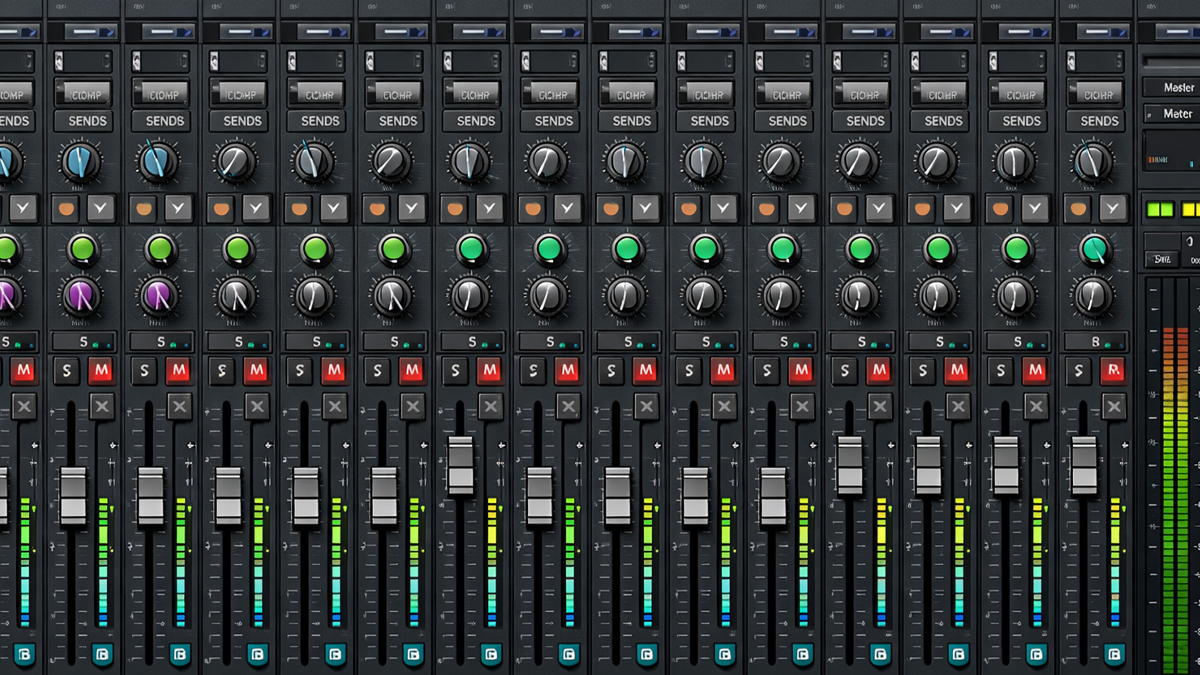
What is DAWs Mixer View?
DAWs Mixer View is the part of a Digital Audio Workstation that looks and behaves like a mixing console. It is where you balance audio levels, place sounds in the stereo field, shape tone with equalizers, control dynamics with compressors, and combine effects like reverb and delay. While other views in a DAW help you record, edit, arrange, and compose, the Mixer View focuses on how all sounds blend as a finished track.
Think of a song as a collection of separate sound sources: vocals, drums, bass, guitars, keyboards, sound effects, and more. Each source usually sits on its own track. Mixer View is the workspace where each track becomes a channel strip with controls for volume, panning, inserts, sends, routing, and metering. When you adjust these controls, you are deciding what the listener will hear most clearly, what will feel wide or narrow, what will feel close or far, and how clean or colorful the final sound becomes.
Mixer View also helps you manage complexity. Modern music projects can contain dozens or even hundreds of tracks. A good mix is not only about making every track sound good by itself, but also about making tracks fit together without masking, distortion, or uneven loudness. Mixer View gives you the tools to solve these problems in a structured, visual way.
How does DAWs Mixer View Work?
Mixer View works by representing every track and bus as a channel that processes audio in a defined signal flow. Although each DAW has its own layout, the basic idea is consistent:
Audio enters a channel
The audio can come from a recorded file, a live input, or a virtual instrument. This audio becomes the channel signal.
The channel processes the signal
Most channels have a place for insert effects, such as EQ, compression, saturation, noise reduction, gating, and creative effects. Inserts usually process the full signal, meaning the entire track passes through them.
You control level and stereo position
The fader sets volume, and pan controls left to right placement. Some DAWs also provide stereo width, balance, dual pan, or panner modes for surround formats.
You send part of the signal to effects
Sends route a copy of the signal to an auxiliary track or bus that holds shared effects like reverb or delay. This approach is efficient and creates a cohesive sound because multiple tracks can share the same space effect.
You route the output
The channel output goes to a bus, a group, or directly to the master output. Buses let you process multiple tracks together, such as a drum bus or vocal bus.
Meters show what is happening
Level meters, peak indicators, RMS or LUFS style meters, and gain reduction meters help you see loudness, headroom, and dynamics. Metering is important because your ears can be fooled by volume differences.
Automation stores movement over time
Automation lets you change fader levels, pan positions, effect parameters, and send amounts across the timeline. This makes a mix feel alive and controlled, especially in choruses, transitions, and breakdowns.
Mixer View is a system for controlling sound flow and sound balance. It is both technical and creative: technical because it manages signal routing and levels, and creative because it shapes emotion, energy, and clarity.
What are the Components of DAWs Mixer View
Most DAWs share a common set of components in Mixer View. Understanding these parts makes mixing faster and more consistent.
Channel strips: A channel strip is the vertical section for a single track. It usually includes a fader, pan, meters, inserts, sends, mute, solo, and record arm. Some DAWs also show input selection and output routing directly on the strip.
Faders: Faders control the output level of each channel. They are the main tool for balancing a mix. Small fader changes can make a vocal feel present or buried, and can change how drums drive the track.
Pan controls: Pan controls place a track left or right in the stereo field. Panning helps separate instruments so they do not fight for the same space. Many mixes use centered placement for lead vocals, kick, snare, and bass, while supporting elements spread wider.
Mute and Solo: Mute silences a channel. Solo lets you hear a channel by itself or in isolation with other soloed channels. These buttons support focused listening and fast troubleshooting.
Level meters: Meters show signal level. They help you avoid clipping, manage headroom, and compare track loudness. Some DAWs offer detailed metering modes, including peak hold, RMS, LUFS, and K metering.
Insert slots: Insert slots host processing plugins such as EQ, compressors, de essers, transient shapers, saturation, and limiters. Inserts usually affect the entire signal path of that channel.
Sends and send levels: Sends route part of a track to an auxiliary channel. The send level controls how much of the track goes to that effect or bus. Sends are essential for shared reverbs, delays, parallel compression, and headphone cue mixes.
Buses and group channels: Buses combine multiple tracks into one channel. You can then process the combined sound, which helps glue instruments together and simplifies automation. Common buses include drum bus, music bus, and vocal bus.
Aux tracks: Aux tracks receive audio through sends or routing. They often hold time-based effects like reverb and delay, or parallel processing chains.
Master channel: The master channel is the final output path. It controls overall level and often hosts final mix processing such as gentle bus compression, tonal shaping, and limiting for listening references. Final mastering is usually separate, but many producers do a safe preview chain on the master.
Routing and I O controls: Routing controls define where audio comes from and where it goes. This includes selecting inputs, setting outputs, sidechain sources, and creating submixes.
Phase and polarity controls: Some mixers include phase invert or polarity buttons. These can fix issues when multiple microphones capture the same source, or when layering sounds causes cancellations.
Gain or trim: Pre fader gain helps you set proper input level before processing and before the fader. Good gain staging improves headroom and plugin performance.
Plugin windows and channel EQ: Many DAWs provide a built in channel EQ view and dynamics section. These integrated tools speed up mixing by reducing the need to open many plugin windows.
Automation lanes and controls: Automation can be shown in Mixer View or linked to it. Some mixers include read and write modes for automation and show parameter changes directly.
What are the Types of DAWs Mixer View: Mixer View can appear in different forms depending on workflow and DAW design. These types are not strict categories, but they describe common approaches.
Traditional console style mixer: This is the classic mixer look: vertical channel strips with faders at the bottom, inserts and sends above, and meters near the top. Many DAWs use this style because it mirrors hardware consoles and is easy to learn.
Split mixers for audio and instruments: Some DAWs separate audio tracks and instrument tracks, or provide filters that show only specific track types. This helps large sessions remain manageable.
Single channel focus view: Some mixers provide a channel inspector or selected channel view that shows detailed controls for one track at a time. This is useful when you want deep control without scrolling across many channels.
Compact mixer view: A compact mixer hides detailed sections and focuses on faders, pans, and basic routing. It is useful on smaller screens or during recording sessions when speed matters.
Bus oriented mixer: Some workflows rely heavily on buses and groups. In such sessions, the mixer is organized around submixes and stem routing. This is common in film, television, and large music productions.
Surround and immersive mixers: Mixers that support surround formats add panner controls and channel formats beyond stereo. You may see 5.1, 7.1, or immersive setups. These mixers often integrate object or bed routing for advanced formats.
Live performance-oriented mixers: Some DAWs used for live performance integrate mixer controls with clip launching and performance routing. The mixer in these systems often emphasizes fast changes, returns, and monitoring.
What are the Applications of DAWs Mixer View
Mixer View is used in many practical tasks across music creation and audio production.
Balancing a song
The most common application is setting the relative loudness of each track so the song feels clear and powerful. A good balance often solves many problems before heavy processing.
Creating space and depth
Using sends to reverb and delay, plus EQ decisions, Mixer View helps you create a sense of distance and environment. Vocals can feel close, while pads can feel wide and far.
Controlling dynamics
Compression, limiting, gating, and expansion are commonly used to control loudness changes and improve consistency. Mixer View makes it easy to compare dynamics across tracks.
Tone shaping and frequency management
EQ in Mixer View helps each instrument occupy its own frequency zone. This reduces muddiness and makes the mix translate better to different speakers.
Group processing and glue
Buses allow multiple tracks to be processed together. For example, processing drum tracks as a group can create a unified punch and feel.
Parallel processing
Parallel compression, parallel saturation, and parallel reverb are common techniques. Mixer View makes parallel routing manageable and repeatable.
Monitoring and cue mixes
In recording sessions, Mixer View helps build headphone mixes, manage latency friendly monitoring, and send different blends to performers.
Sound design and creative mixing
Mixer View is not only corrective. It is creative. Heavy distortion on a synth bus, rhythmic delays on a vocal, or automated filter sweeps can become part of the musical identity.
Preparing stems and deliverables
Mixer View helps route tracks into stems such as drums, bass, vocals, and music. This is essential for collaboration, live playback, remixes, and post production.
What is the Role of DAWs Mixer View in Music Industry
Mixer View plays a central role in turning raw recordings into professional releases. In the music industry, the difference between a demo and a record is often the mix. Mixer View is the main environment where that transformation happens.
For producers, Mixer View helps shape the emotional impact of a song. A louder, brighter vocal can make lyrics feel intimate and confident. A tighter drum bus can make a track feel modern and energetic. For mixing engineers, Mixer View is the control center for technical decisions like headroom, clarity, and stereo imaging. For mastering engineers, the mix quality affects how loud and clean the final master can be. A balanced mix gives mastering a strong foundation.
Mixer View also supports industry workflows like revisions, versioning, and collaboration. Engineers often deliver multiple versions: instrumental, acapella, clean edit, and radio edit. Mixer View routing and buses make it easier to generate these versions with consistency. In post-production and media scoring, Mixer View is used to mix dialogue, music, and effects to meet broadcast standards and platform requirements.
In short, Mixer View is one of the main places where music becomes release ready, consistent, and competitive.
What are the Objectives of DAWs Mixer View
Mixer View has clear objectives that guide mixing decisions.
- Clarity: Make every important part of the song audible without harshness or clutter.
- Balance: Set levels so no element overwhelms the mix unless that is the artistic intention.
- Translation: Make the mix sound good on many systems: headphones, car speakers, phones, clubs, and studio monitors.
- Headroom management: Avoid clipping and maintain enough space for peaks, processing, and later mastering.
- Stereo and depth design: Place sounds across left to right and front to back using panning, level, EQ, and time-based effects.
- Consistency over time: Control dynamics and use automation so verses, choruses, and transitions feel intentional and stable.
- Workflow efficiency: Organize tracks, buses, and routing so projects are easy to revise and expand.
What are the Benefits of DAWs Mixer View
Mixer View offers major benefits for both beginners and professionals.
Faster decision making
Because controls are centralized, you can adjust many tracks quickly. This encourages you to make mixing decisions based on the whole song rather than isolated parts.
Better organization
With grouping, bussing, color coding, and track filtering, large sessions become manageable. Organization reduces mistakes and saves time during revisions.
Improved sound quality
Good gain staging, metering, and routing improve technical quality. Cleaner levels reduce distortion and improve plugin performance.
Consistent effects and space
Using shared sends and aux tracks creates cohesive ambience. It also saves CPU because one reverb can serve many tracks.
Creative control
Mixer View makes it easy to experiment with processing chains, parallel effects, and automation. Many signature sounds are created inside the mixer.
Professional deliverables
Stems, alternate mixes, and print tracks can be routed and exported efficiently. This supports common industry needs for sync, live shows, and label delivery.
What are the Features of DAWs Mixer View
While each DAW differs, modern Mixer Views often include advanced features that improve workflow and mixing results.
Unlimited channels and flexible routing
Unlike hardware mixers, DAWs can support many tracks and complex routing. You can build buses within buses, create parallel chains, and route signals in creative ways.
Plugin management
Mixer View typically supports drag and drop plugin chains, preset saving, bypass, A B comparison, and plugin delay compensation so timing remains tight.
Sidechain support
Sidechain routing allows one track to control processing on another, such as kick triggered compression on bass or dynamic EQ triggered by vocals.
VCA style control and grouping
Some DAWs offer VCA faders or group control that changes multiple faders while keeping relative balances. This is helpful for drum groups and vocal stacks.
Track folders and mixer visibility
Visibility management lets you hide tracks, show only buses, or focus on selected channels. This keeps large projects clean.
Integrated channel strips
Many DAWs include built in EQ, compression, and gating within the mixer, allowing quick adjustments without opening separate plugins.
Advanced metering
Modern mixers may provide peak, RMS, LUFS, spectrum, phase correlation, and surround metering. Better metering leads to better decisions.
Automation modes
Automation features include read, write, latch, touch, trim, and preview modes. These support detailed mix moves and safe revisions.
Control surface integration
Mixer View often integrates with hardware controllers. Physical faders can make mixing more intuitive and faster.
What are the Examples of DAWs Mixer View
Different DAWs present Mixer View in their own style, but the purpose remains the same. Here are common examples that many music creators recognize:
Ableton Live has a mixer section integrated into Session View and Arrangement View, with track controls, sends, returns, and routing designed for both studio and live performance.
Logic Pro includes a full Mixer with channel strips, a built in channel EQ, dynamics options, and strong bussing and routing for production and mixing.
Pro Tools is known for its Mix Window, which emphasizes a console like workflow, detailed routing, and professional audio editing and mixing tools.
FL Studio features a Mixer that is highly flexible for routing, effects chains, and creative processing, with a clear focus on plugin workflows.
Cubase provides MixConsole, with visibility agents, channel strip modules, and features for large sessions and detailed engineering work.
REAPER offers a customizable mixer where users can design layouts, routing, and workflows to match their needs.
Studio One includes a Console with strong drag and drop routing and a fast workflow for buses, FX channels, and automation.
These examples show that Mixer View is a universal concept across DAWs, even if the layout and terminology change.
What is the Definition of DAWs Mixer View
DAWs Mixer View is defined as the dedicated mixing interface inside a Digital Audio Workstation that displays tracks as channels and provides controls for level, stereo placement, signal processing, effects routing, grouping, and output routing, enabling the user to combine multiple audio sources into a coherent final mix.
What is the Meaning of DAWs Mixer View
The meaning of DAWs Mixer View is simple: it is the place where you turn many separate sounds into one finished listening experience. It is where you decide what is loud, what is quiet, what feels centered, what feels wide, what feels close, and what feels distant. It is also where you manage the technical side of audio so the result is clean, controlled, and ready for release.
What is the Future of DAWs Mixer View
The future of DAWs Mixer View is likely to become more intelligent, more immersive, and more adaptable to different creators.
Smarter assistance without replacing creativity: More mixers will include intelligent suggestions for gain staging, masking reduction, and starting point EQ or compression settings. These tools can speed up routine tasks, while humans still make the final artistic decisions.
Immersive and spatial audio growth: As spatial formats expand, Mixer View will offer easier immersive panning, object routing, and monitoring options. Mixers will continue to support stereo while adding better workflows for multi-channel and immersive outputs.
Better collaboration features: Cloud linked sessions and version control can make Mixer View changes easier to track across teams. More mixers will support commenting, mix snapshots, and safe recall systems.
More modular and customizable interfaces: Users have different workflows: beat making, recording bands, post production, podcasts, live performance. Mixer View will likely become more flexible, allowing layouts that match each workflow.
Improved metering and loudness workflows: As platforms standardize loudness expectations, mixers will integrate loudness targets, true peak monitoring, and mix health indicators more deeply.
Deeper hardware and touch integration: Physical controllers, tablets, and touch screens can make mixing feel closer to real consoles. Mixer Views will better map to hardware, improving speed and feel.
Mixer View will continue to be the heart of mixing, but it will become easier to learn, faster to operate, and better suited for modern delivery formats.
Summary
- DAWs Mixer View is the console style workspace where tracks become channels with faders, pan, inserts, sends, routing, and meters.
- It works by managing signal flow from input through processing and routing to buses and the master output.
- Key components include channel strips, faders, pan, meters, inserts, sends, buses, aux tracks, routing controls, and automation.
- Mixer View types include traditional console layouts, compact mixers, single channel focus views, bus-oriented mixers, and immersive mixers.
- It is used for balancing levels, shaping tone, controlling dynamics, building space with effects, and preparing stems and deliverables.
- In the music industry, Mixer View is essential for turning recordings into release ready mixes and handling professional workflows.
- Objectives include clarity, balance, translation across systems, headroom management, stereo and depth design, and consistency.
- Benefits include faster workflow, better organization, improved sound quality, cohesive effects, and strong creative control.
- Features often include flexible routing, sidechain support, advanced metering, automation modes, and control surface integration.
- The future points toward smarter assistance, stronger immersive workflows, improved collaboration, better metering, and more customization.

