

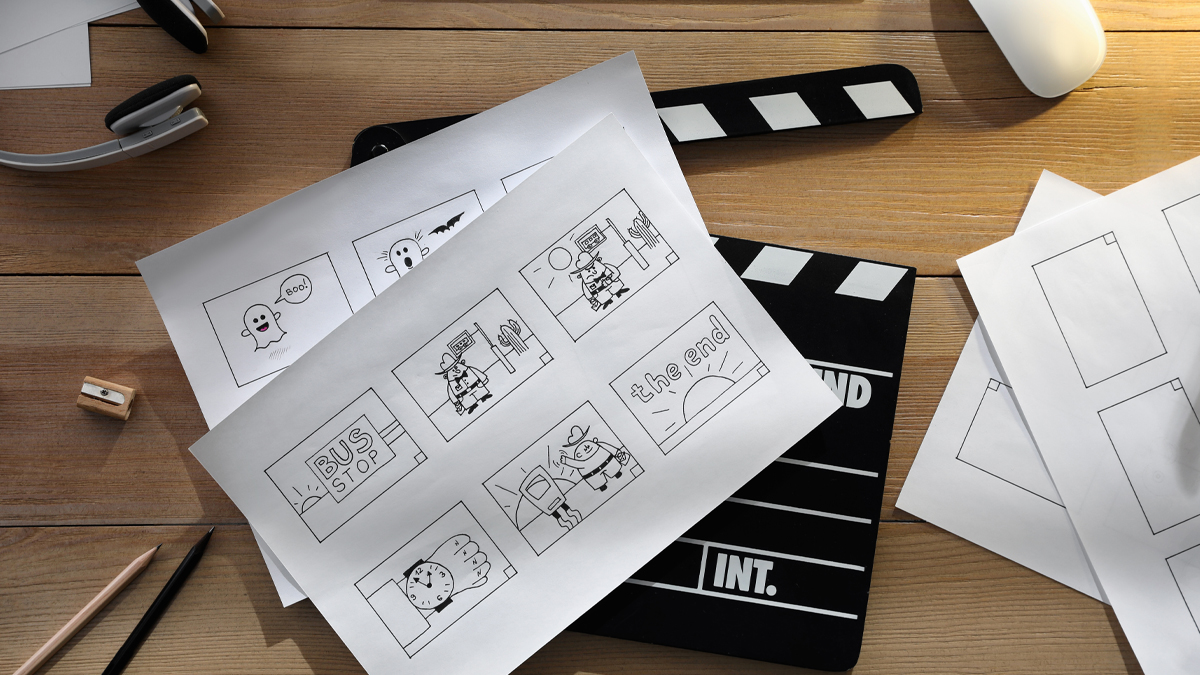
What is Storyboarding?
Storyboarding is a planning method where a film is mapped out shot by shot using a sequence of drawings or frames. Each frame represents a moment in time, similar to a comic strip, but built specifically for cinema. In the world of previsualization under cinematic technologies, storyboarding is often the first clear visual draft of how a scene will look and feel before the cameras roll. It helps filmmakers explore camera angles, blocking, movement, pace, and emotional beats without spending money on sets, locations, or complex technical setups.
Core idea: Storyboarding turns ideas into visible decisions. Instead of only describing a scene in words, the team can see what the audience might see.
Why it matters in previsualization: Previsualization is about reducing uncertainty. Storyboards make the invisible visible early, so creative and technical choices can be tested and improved.
Who uses it: Directors, cinematographers, production designers, stunt coordinators, editors, VFX teams, and even actors benefit because everyone gains a shared reference for intention and timing.
In simple terms, storyboarding is a bridge between the script and the screen. It is a practical way to design the visual language of a film before production begins.
How does Storyboarding Work?
Storyboarding works by converting the script into a visual sequence that represents the final film flow, scene by scene and shot by shot. The process usually starts with reading the script carefully, identifying key actions, emotions, and story turning points, and then deciding how to translate those moments into images.
Script breakdown: The team identifies locations, characters, action beats, props, and effects requirements. This breakdown highlights complex areas like stunts, VFX shots, crowd scenes, and choreography that need careful planning.
Shot planning: The director and cinematographer decide on shot sizes and angles, such as wide shots for geography, medium shots for interaction, and close ups for emotion. They also plan camera movement, lens feel, and composition goals.
Frame creation: Each planned shot becomes a storyboard panel. Panels can be rough sketches or detailed drawings, depending on the needs of the project. The goal is clarity, not artistic perfection.
Annotations: Notes are added under each panel, such as camera movement, character movement, dialogue cues, and timing. These notes make the storyboard useful for departments beyond the director.
Review and iteration: Storyboards are discussed with key teams. If a sequence feels confusing, slow, or expensive, it can be redesigned early. This is one of the strongest benefits in previsualization.
Integration into animatics and previz: Many productions convert storyboards into animatics, adding rough timing and temporary sound, and later into 3D previz for complex sequences. Storyboarding is often the start of that pipeline.
What are the Components of Storyboarding
A strong storyboard is built from a set of components that make it readable, actionable, and aligned with the filmmaking process. Each component supports communication across departments and helps the storyboard connect smoothly to previsualization.
Storyboard panels: These are the frames that show composition, subject placement, action, and key moments. Panels indicate what the camera sees at important points in the shot.
Shot information: Each panel often includes shot identifiers, such as scene number and shot number, so the sequence can be referenced during planning, scheduling, and shooting.
Camera direction and movement: Arrows, symbols, and notes show pans, tilts, tracking, crane moves, zooms, and handheld feel. This prevents confusion when translating the board into a shot list.
Character blocking: Storyboards show where characters stand, how they move, and how their positions change. This is essential for staging, choreography, and actor continuity.
Action beats: Key moments like a punch landing, a door opening, a reveal, or a character reaction are highlighted so timing and emphasis are clear.
Scene geography: Establishing frames and layout cues help the audience understand where everyone is, where exits are, and how space connects. This is especially important in action and suspense.
Transitions and editing intent: Storyboards often hint at cuts, match cuts, dissolves, or rhythm changes. When paired with animatics, this becomes a draft of editing pace.
Technical and department notes: Storyboards may include notes for lighting, VFX markers, props, set pieces, and sound cues. These notes turn drawings into production guidance.
What are the Types of Storyboarding
Different productions need different storyboard styles. The type of storyboard chosen depends on budget, genre, complexity, time, and how much precision is required in previsualization.
Thumbnail storyboards: These are quick, small sketches used to explore ideas rapidly. They help find composition and flow without spending time on detail.
Presentation storyboards: These are cleaner and more polished boards used to communicate a vision to producers, studios, or departments. They are often easier for non technical viewers to understand.
Technical storyboards: These focus on camera mechanics, staging precision, and clear instructions for execution. They are common for action, stunts, VFX, and complicated blocking.
Action and stunt storyboards: These prioritize choreography, safety, and spatial clarity. They show who moves where, when impacts happen, and how the camera stays safe and readable.
VFX storyboards: These focus on shots that require visual effects, including plates, tracking needs, green screen considerations, and integration with digital elements.
Animatic storyboards: These are storyboards placed into a timeline with rough pacing, temporary sound, and basic movement. Animatics are a major step in previsualization because they test timing and emotional rhythm.
Digital storyboards: These are created with software tools, making them easy to revise, share, and connect to shot lists and production documents.
3D storyboard hybrids: Some teams combine storyboard frames with simple 3D layouts to clarify camera movement and space. This often sits between 2D boards and full previz.
What are the Applications of Storyboarding
Storyboarding is used anywhere filmmakers need clarity before committing resources. In the broader cinematic technologies ecosystem, it acts as a planning layer that supports both creative exploration and technical execution.
Previsualization planning: Storyboards are often the starting blueprint for animatics and 3D previz. They define what needs to be simulated, timed, and refined.
Shot listing and scheduling: Once the storyboard is approved, it helps create a shot list, estimate shoot days, and predict equipment needs.
Stunts and action design: Storyboarding helps choreograph fights, car chases, falls, and complex movement sequences so everyone understands timing and safety requirements.
Visual effects planning: VFX shots are expensive. Storyboards help define what is practical, what is digital, and what needs special plates or motion control.
Production design and set builds: When the art department sees the frames, they can prioritize which set areas must be built in detail and what can be suggested.
Cinematography and lighting planning: Storyboards guide lens choice, camera placement, and lighting motivation. They help the cinematographer plan coverage that matches the intended mood.
Editing and pacing tests: When turned into animatics, storyboards become an early edit. If the story feels slow or confusing, changes can be made before the real shoot.
Actor preparation and blocking: Actors can understand staging and intention, especially when scenes involve complex movement or timing with effects.
Communication across departments: Storyboards act as a shared language. They reduce misunderstandings that often occur when ideas stay only in verbal descriptions.
What is the Role of Storyboarding in Cinema Industry
In the cinema industry, storyboarding is both a creative tool and a production tool. It supports storytelling, efficiency, safety, and collaboration, which are essential in modern filmmaking where timelines and budgets are tight.
Creative alignment: A film involves many people interpreting the script. Storyboards create a shared visual target so departments move in the same direction.
Risk reduction: Complex scenes carry risk, including safety risk, cost risk, and continuity risk. Storyboards reduce those risks by revealing problems early.
Efficiency in production: When a team knows what shots are needed, fewer hours are wasted deciding on set. This improves daily productivity and reduces overtime pressure.
Quality control: Storyboards encourage intentional filmmaking. Instead of collecting random coverage and hoping to find the film in the edit, the film is designed with purpose.
Support for cinematic technologies: Modern cinema often involves virtual production, VFX, and advanced camera systems. Storyboards help plan technical requirements early, making these technologies more effective.
Improved collaboration: When storyboards are shared with stunts, VFX, art, camera, and sound, everyone can contribute solutions before shooting begins. This leads to better results with fewer surprises.
In short, storyboarding is a core step in professional filmmaking because it turns a creative vision into a coordinated plan.
What are the Objectives of Storyboarding
The objectives of storyboarding go beyond making drawings. The true purpose is to shape the story experience while making production smarter and safer.
Clarify visual storytelling: The objective is to decide what the audience sees, when they see it, and how that sequence creates meaning and emotion.
Plan camera language: Storyboards help set the style, such as calm and steady framing for drama, or energetic movement for action.
Control pacing: By mapping beats and cuts, storyboards help determine rhythm. This becomes even clearer when converted into animatics.
Strengthen continuity: Storyboarding helps maintain consistent screen direction, character placement, prop continuity, and spatial logic across shots.
Support decision making: Storyboards help teams decide what is essential and what can be simplified. This is especially useful when time or budget constraints appear.
Improve safety and coordination: For stunts and complex movement, storyboards coordinate timing so that performers and camera teams operate safely.
Optimize resources: The objective is to reduce wasted effort by planning the right shots, avoiding unnecessary coverage, and predicting equipment needs.
Enable early feedback: Storyboards allow producers and key stakeholders to review sequences early and suggest changes before they become expensive.
What are the Benefits of Storyboarding
Storyboarding brings practical and creative benefits that directly improve the filmmaking process, especially within previsualization workflows.
Better communication: A storyboard removes ambiguity. Everyone can see the plan and discuss it with the same reference.
Faster problem solving: Issues like confusing geography, weak staging, or impossible camera movement show up early, when solutions are cheaper.
Stronger storytelling: Storyboards help filmmakers focus on what the audience feels and understands. They support clarity, tension, surprise, and emotional build.
Cost control: By planning shots in advance, the production can avoid unnecessary setups, reduce reshoots, and minimize overtime.
Improved scheduling: Storyboards help estimate how long a sequence will take to shoot and what resources are required.
More confident shooting: When the crew arrives with a plan, the day runs smoother. Confidence improves performance, and morale often improves too.
Smoother VFX integration: Storyboards highlight where effects are needed, what plates must be captured, and how practical elements should align with digital elements.
Support for collaboration: Departments can provide input early. For example, the stunt team can adjust choreography, and the art team can suggest set changes that improve framing.
Better previsualization outcomes: Storyboards provide the foundation for animatics and 3D previz, allowing a strong pipeline from early planning to execution.
What are the Features of Storyboarding
Certain features make a storyboard truly useful for cinema. These features are not about artistic style alone. They are about clarity, usability, and connection to production needs.
Sequence clarity: A strong storyboard reads smoothly from frame to frame, making the story action easy to follow.
Cinematic composition: Panels show framing choices that support story intent, such as isolation, intimacy, or power dynamics.
Camera movement indicators: Arrows and notes clearly describe how the camera moves, not just where it is placed.
Readable action: The storyboard highlights key actions, reactions, and reveals. The audience experience is prioritized over extra detail.
Department friendly notes: Notes for stunts, VFX, art, sound, and lighting help teams prepare without guessing.
Scalability: Storyboards can be rough for early exploration and later refined for technical accuracy. The best storyboards evolve with the project.
Edit awareness: Good storyboards think like an editor. They consider shot progression, coverage needs, and transitions.
Compatibility with previsualization tools: Digital storyboards are often built for easy conversion into animatics, shot lists, and 3D previz tasks.
Version control: Modern workflows benefit from storyboards that can be updated, tracked, and shared quickly so the whole team stays aligned.
What are the Examples of Storyboarding
Storyboarding appears across almost every genre and budget level, but it becomes especially visible in sequences where clarity and timing matter.
Action sequence example: A chase scene can be storyboarded to define where vehicles enter, how turns are covered, when the camera switches perspective, and how the audience stays oriented. This prevents confusion and keeps tension rising.
Horror and suspense example: A hallway sequence can be storyboarded to control reveals, shadows, and pacing. The storyboard helps decide when to show the threat and when to hide it.
Comedy timing example: A joke often depends on framing and reaction timing. Storyboards help plan the setup shot, the punchline reveal, and the reaction beat.
Animation example: In animation, storyboards are central. Many animated projects rely on story reels, which are expanded storyboard sequences with timing and audio. This helps refine story long before final animation.
VFX heavy example: A scene with a digital creature can be storyboarded to define eye lines, camera distance, and integration points. This guides both on set shooting and later visual effects work.
Dialogue scene example: Even simple conversations benefit from storyboards when the goal is a specific emotional arc. The storyboard helps plan when to stay wide, when to move closer, and how to shift focus between characters.
These examples show that storyboarding is not only for explosions and spectacle. It is also a tool for emotion, clarity, and cinematic rhythm.
What is the Definition of Storyboarding
Storyboarding is the process of creating a sequential visual plan for a film, episode, or scene, where each panel represents a shot or key moment and includes notes that guide camera, staging, and timing. In cinematic technologies and previsualization, storyboarding functions as an early visual blueprint that supports later steps like animatics, 3D previz, shot listing, and coordinated production planning.
Key definition focus: Storyboarding is sequential, visual, and intentional. It exists to plan how the story is shown, not only what the story is.
Practical definition focus: Storyboarding is a communication document that aligns creative intent with production execution across departments.
What is the Meaning of Storyboarding
The meaning of storyboarding goes beyond drawings on paper or screens. It represents deliberate visual thinking. When filmmakers storyboard, they are deciding how the audience will experience the story through images and time.
Meaning in storytelling: Storyboarding is a way to design emotion and understanding. It shapes what the viewer notices, what they miss, and what they feel at each moment.
Meaning in teamwork: Storyboarding means shared vision. It replaces vague descriptions with visible decisions that teams can discuss and improve.
Meaning in previsualization: Storyboarding means early testing. Before expensive steps begin, the film can be previewed in structure and rhythm, then adjusted.
Meaning in craft: Storyboarding is a discipline of clarity. It forces choices about framing, movement, and pacing, which strengthens the final film.
In simple terms, storyboarding means planning cinema visually, so creative goals and production realities meet in a smart, organized way.
What is the Future of Storyboarding
The future of storyboarding is closely tied to how previsualization and cinematic technologies continue to evolve. Storyboarding will remain valuable, but the way it is created and used is becoming more connected, interactive, and integrated with production pipelines.
Deeper integration with real time previz: Storyboards will increasingly connect to 3D layouts, virtual cameras, and real time engines, allowing teams to move from 2D frames to interactive space quickly.
More collaborative cloud workflows: Teams across locations can review, comment, and iterate faster. This supports modern production models where departments are distributed globally.
Greater use of virtual production planning: With LED stages and in camera effects, storyboarding will help define what should be captured live and what should be finished later. Clear early planning becomes even more important when technology choices affect cost and schedule.
Smarter versioning and asset linking: Future storyboards will likely link directly to shot lists, lens plans, set diagrams, VFX tasks, and editing timelines, reducing manual duplication of information.
Faster iteration using assistive tools: Digital tools can help speed up layout, perspective, and continuity checks. Even with assistance, human judgment will remain central because storyboarding is about storytelling choices, not only drawing speed.
More immersive formats: Some storyboarding will move into VR style previsualization, where teams can step into a scene layout and evaluate framing and movement from inside the environment.
The core future truth: The tools will change, but the purpose stays the same. Storyboarding will continue to be a key way to design the viewer experience before production.
Summary
- Storyboarding is a shot by shot visual plan that translates a script into clear images and timing decisions.
- It is a major foundation of previsualization and often leads into animatics and 3D previz workflows.
- Storyboarding improves communication, reduces risk, supports better scheduling, and strengthens storytelling clarity.
- Key components include panels, shot identifiers, camera movement cues, blocking, action beats, and department notes.
- Different types exist, from quick thumbnails to technical boards, animatics, and digital workflows.
- The future of storyboarding is becoming more integrated with real time tools, cloud collaboration, and virtual production planning.

